
Hi Paul. I have a very weird problem with Cubase. Can you help me? – EG
I received the above message from E and we connected for a remote support session the next day. E explained the problem in more depth:
Every time I try and import this audio file into Cubase it’s playing back too fast and in the wrong key. Why is this?
I had a look at E’s Cubase settings and could immediately see what was going on. Cubase was importing the audio file at a different sample rate to the project and the dialogue box that gave the option to automatically adjust the sample rate had been disabled.
Solving the Problem
We opened Cubase’s Preferences and opened the page for Editing-Audio
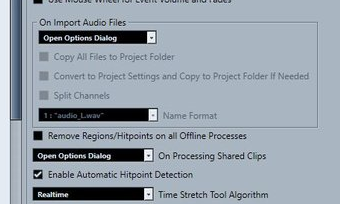
On Import Audio Files had been set to ‘Use selected settings’. I told E to set it to ‘Open Options Dialog‘ and to save and close the preferences.
We imported his audio file again. This time, a dialog box appeared:
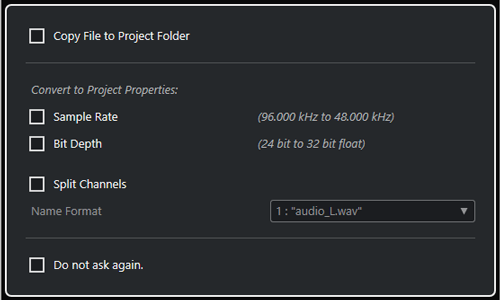
I told E to check the box marked Sample Rate. (I also advised him to use Copy to Project Folder for file management reasons)
When E played his track again, the imported audio file now played at the right speed and in the right key. We then moved on to resolve another problem he was having with his MIDI keyboard.
If you have any questions about features of Cubase and would like to book time with a music technology expert, please get in touch.
Recent Reviews
Let’s Get Your System Running Smoothly.
No automated tickets, no waiting queues — just one-to-one help from an experienced music technology specialist. I’ll connect to your system remotely, identify the issue, and guide you through the fix.
