
Hi Paul. I’ve been trying the assign the knobs on my Novation Launch Control XL to control mixer features in Logic Pro. Can you help? – J
I received the above message from a new client, and we arranged to connect for a remote support session.
Once we were connected via WhatsApp voice chat and we were sharing screens via AnyDesk, my client explained what he wanted to achieve in more detail:
I want to be able to control three aux send levels of 8 audio tracks in Logic using the knobs on the Launch Control. I have been able to assign the first fader using Logic’s Controller Assignments window, but I can’t get the second track working. I contacted Apple and they told me to contact Novation. The support at Novation told me to use the Logic MIDI environment, but I don’t know how to use this.
I considered my client’s problem and suggested we had three ways to proceed:
- Use Expert Controller Assignments to build a custom configuration for the Launch Control from scratch
- Edit an existing controller assignments script to add in the functionality he wanted to achieve.
- Create a custom MIDI environment setup.
Of the three options, I recommended creating a custom MIDI environment would be the best way to proceed. Especially if my client intended to use this controller in a live performance environment. Controller Assignments will dynamically change based on the parameters of the selected track. It would be easier to ‘hard-wire’ the knobs of the Launch Control to particular parameters in Logic.
I then spent the next 45 minutes teaching my client the basics of Logic’s MIDI environment and how to achieve the results he wanted.
I explained that we could use a Monitor device to view the raw MIDI data coming from the Launch Control and make a note of which CC numbers were being used by each knob.
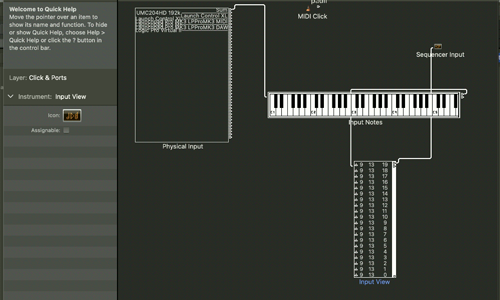
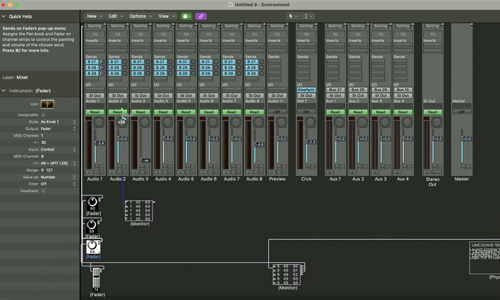
I then showed my client how we could create faders and knob devices in the MIDI environment which could be set to be controlled by the CC numbers coming from the Launch Control.
We could then assign the output of these knobs and faders to match the Sysex MIDI numbers that Logic assigns to the controls for each channel strip in the mixer. Using virtual cabling inside the MIDI environment meant that my client could quickly grasp what we were doing and how we were routing the data.
After I had set up the first channel strip of the Launch Control, my client took over and set up the next one for himself. I could see my client now understood the MIDI signal path.
This lesson on using Logic’s MIDI environment lasted for 60 minutes and by the end my client had his question answered and was empowered to use Logic’s MIDI environment to make his own custom setup.
If you need expert help in any aspect of using Logic Pro, MIDI controllers or any other music technology questions please get in touch.
Not sure it’s the same problem? Ask a question first
Recent Reviews


Let’s Get Your System Running Smoothly.
No automated tickets, no waiting queues — just one-to-one help from an experienced music technology specialist. I’ll connect to your system remotely, identify the issue, and guide you through the fix.
