
Hi Paul. I have no sound coming from my TASCAM audio interface. I can hear my microphone through the headphones but not Cubase. Also only microphone inputs 1 and 2 are working. Can you help me please? – Mike
I received the above message from Mike and we arranged a time to connect for a remote support session.
From the text in Mike’s message, I already had an idea of what the problem might be.
The Tascam 4×4 has a knob on the front of the unit that is labelled MONITOR BALANCE.
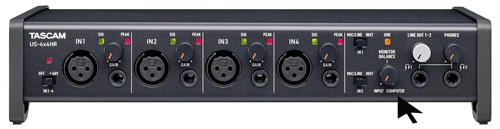
This knob can be set to INPUT and the user will hear the live sound coming from their microphone.
The knob can be set to COMPUTER and the user will hear sound coming from their computer. (Eg Logic, Cubase, Ableton, YouTube, etc)
Or the knob can be set somewhere in the middle to achieve a balance between the two. For example, a singer wearing headphones might want to hear their live vocals while at the same time hearing a backing track being played back by their DAW.
Setting the MONITOR BALANCE knob around 12 o’clock allows the singer to set the levels of their live vocals and backing track in relation to each other.
Once Mike and I were connected for our remote support session, it did indeed turn out that MONITOR BALANCE was set fully left and this was the reason for his not being able to hear any sound from his Mac. Once the knob was set to the middle, Mike could now hear his backing tracks coming from Cubase.
I also showed Mike how to use the TASCAM software installed with his audio interface to enable all the inputs.
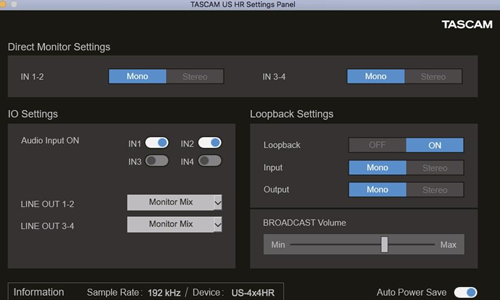
We needed to make active IN3 and IN4 in the US HR Settings Panel, found in the Applications folder on his Mac.
Once we had all the settings correct, Mike and I ran some tests to confirm everything was working and he could now record in Cubase.
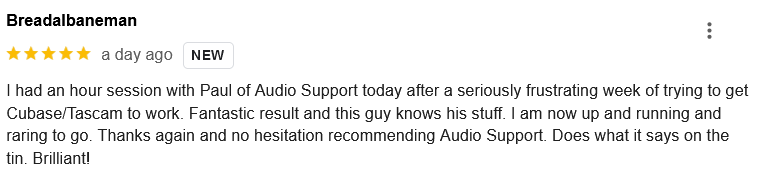
At the end of the session, Mike was kind enough to leave me this nice review:
“I had an hour session with Paul of Audio Support today after a seriously frustrating week of trying to get Cubase/Tascam to work. Fantastic result and this guy knows his stuff. I am now up and running and raring to go. Thanks again and no hesitation recommending Audio Support. Does what it says on the tin. Brilliant!”
Thanks Mike! Happy to help and here if you or anyone else needs similar help in the future.
Recent Reviews
Let’s Get Your System Running Smoothly.
No automated tickets, no waiting queues — just one-to-one help from an experienced music technology specialist. I’ll connect to your system remotely, identify the issue, and guide you through the fix.
