
Hi Paul. I tried to update the PreSonus Universal Control software to the latest version from my account on the PreSonus website, but now it’s not working, my Quantum audio interface isn’t connecting with Logic at all. Can you help please? – Chris
I received the above message via the enquiry form on my website and arranged a time with Chris to connect for a remote support session.
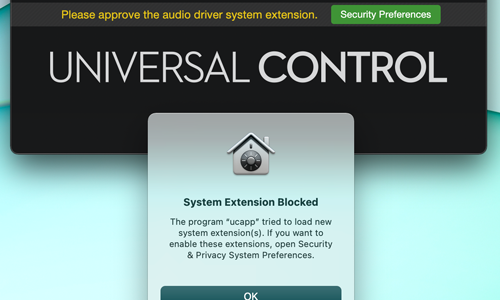
This issue turned out to be a simple one to resolve. After my client had installed the updates for his PreSonus Universal Control software, he had missed the 30-minute window to ‘Allow’ the OSX driver extensions to run in OSX’s Security Preferences.
PreSonus have published a guide on how to do this on their own website:
I followed the instructions from PreSonus’ site and removed and reinstalled the driver. After installation, I went straight to the security preferences and allowed the system extension.
For the remainder of the session, I spent time with Chris making sure the rest of his Logic system was working properly. We checked over his plug-ins to make sure everything was loading correctly and I gave him some advice about which version of Kontakt was the right one to use with his version of Logic Pro.
Recent Reviews
Let’s Get Your System Running Smoothly.
No automated tickets, no waiting queues — just one-to-one help from an experienced music technology specialist. I’ll connect to your system remotely, identify the issue, and guide you through the fix.
More Case Studies
Recent problems solved for real clients.
Sony DAT Player Repair: Diagnosing a Stuck Tape Door
22 January 2026
Client’s Question
Why won’t my Sony DAT machine door open or close?
Session Result
Hardware fault diagnosed, client referred for specialist repair.
Read Full Case Study Report: Sony DAT Player Repair: Diagnosing a Stuck Tape DoorMarshall MG100HCFX Preset Fix: Stop Random Changes
19 January 2026
Client’s Question
Why do my Marshall MG100HCFX amp presets keep changing by themselves?
Session Result
Amplifier preset stability achieved via procedural workaround.
Read Full Case Study Report: Marshall MG100HCFX Preset Fix: Stop Random ChangesFixing the Ableton OneDrive Conflict on Windows 11
18 January 2026
Client’s Question
How do I move my Ableton User Library out of OneDrive?
Session Result
Ableton library relocated, OneDrive space recovered.
Read Full Case Study Report: Fixing the Ableton OneDrive Conflict on Windows 11
Client’s Question
Why is Pro Tools crashing on Windows 11 when the splash screen reaches “Initializing MIDI Engine”?
Session Result
Resolved by reinstalling OneDrive, properly disabling folder backup to restore local paths, and then safely removing the cloud service.
Read Full Case Study Report: Case Study: Pro Tools 2025.12 Crash & The OneDrive Phantom Folder