Last week, I remotely connected with a client who I have been working with for a number of years. He needed my help as he was experiencing glitches in his audio whilst running Kontakt instruments in Cakewalk by Bandlab. (This software is also branded as Sonar Professional.)
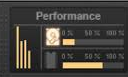
This was an unusual problem which took me a while to figure out. After we set up our remote screen sharing connection via AnyDesk and I was looking at my client’s screen, he showed me the issue. Even in a simple track with just one Kontakt instrument, we were hearing stuttery glitches and could see obvious CPU spikes in the performance monitor.
I went through my usual troubleshooting steps to make sure all audio settings in Windows and Cakewalk were optimised, but the glitches still remained when using Kontakt to play back MIDI parts on instrument tracks. I updated the drivers for my client’s Focusrite Scarlett audio interface and experimented to see if any other software on his laptop was causing the issue to occur. I researched online to see if others were experiencing problems with this combination of software and hardware.
My client had a very new and powerful laptop, so processing power shouldn’t be the problem. I experimented with CPU settings in Kontakt, but that didn’t work either.
Eventually I found the problem and solution lay in the second page of Cakewalk’s Audio Preferences.
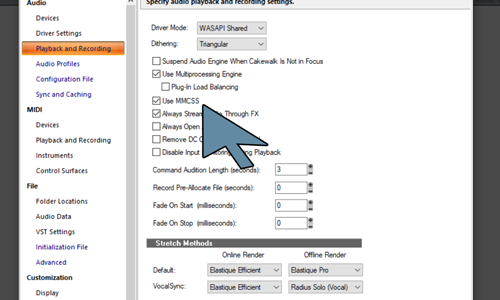
Disabling Multimedia Class Scheduler Service (MMCSS) solved the problem.
From the Cakewalk/Sonar Documentation:
The Multimedia Class Scheduler Service (MMCSS) provides Windows multimedia programs, including SONAR, with prioritized access to CPU resources for time-sensitive processing.
In this instance, Cakewalk’s MMCSS was causing a conflict with Kontakt’s expected use of the CPU resources. MMCSS was introduced by Cakewalk developers to resolve CPU issues with previous versions of Windows, but was now no longer needed.
I tested that disabling MMCSS hadn’t caused any other problems by running one of my client’s largest projects and making sure all his instruments and effects loaded and ran smoothly. We were pleased to find that disabling MMCSS had cured all the glitches.
If you are experiencing similar issues with Cakewalk, Kontakt Instruments or any aspect of Windows audio and would like to book a remote support session, please get in touch.
Recent Reviews
Let’s Get Your System Running Smoothly.
No automated tickets, no waiting queues — just one-to-one help from an experienced music technology specialist. I’ll connect to your system remotely, identify the issue, and guide you through the fix.