Skip to content

Create Empty Button Hidden in Cubase Hub – Solved

  • by

Sometimes settings in Windows can cause Cubase to not fit onto the screen properly.

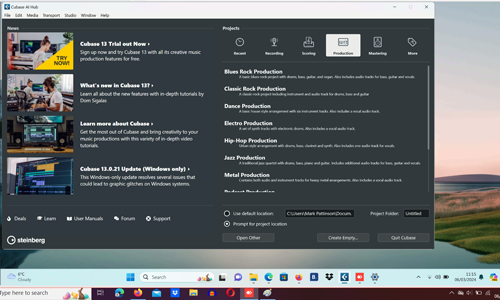
In this example from a recent remote support session, the Create Empty button at the bottom of Cubase’s Hub is hidden from view.
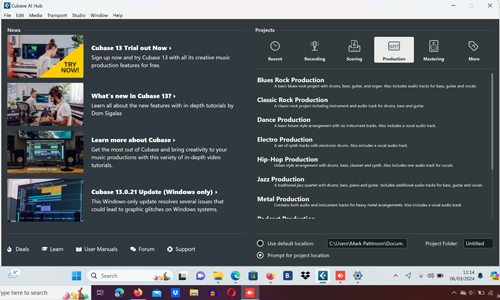
This problem can be solved by right-clicking on the desktop and selecting Display Settings from the menu.

Change the Scaling settings to find the best fit for your screen. In the example pics, the problem was solved for my client by changing scaling from 200% to 175%.
Categories: ,

No automated tickets, no waiting queues — just one-to-one help from an experienced music technology specialist. I’ll connect to your system remotely, identify the issue, and guide you through the fix.

Recent problems solved for real clients.

Preparing for a Studio Hardware Installation

Client’s Question

What cables do I need to connect my hardware synths to my mixer?

Session Result

Equipment audited, cable inventory confirmed, site visit planned.

Read Full Case Study Report: Preparing for a Studio Hardware Installation
Mono Microphone Only in Left Speaker Fix in Logic Pro

Client’s Question

Why is my mono mic input only coming out of the left speaker in Logic Pro?

Session Result

Mono input successfully centred by changing Logic Pro track format from Stereo to Mono.

Read Full Case Study Report: Mono Microphone Only in Left Speaker Fix in Logic Pro
Managing Native Instruments Komplete Libraries in Kontakt

Client’s Question

How do I hide unwanted libraries in the Kontakt side pane?

Session Result

Unused libraries hidden, visual clutter removed.

Read Full Case Study Report: Managing Native Instruments Komplete Libraries in Kontakt
Using Professional Studio Microphones with WhatsApp

Client’s Question

How do I use my Focusrite interface and XLR mic with WhatsApp?

Session Result

WhatsApp Desktop app configured to route audio through Focusrite interface.

Read Full Case Study Report: Using Professional Studio Microphones with WhatsApp