
One of my long-term technical support clients, John, had bought the app Loopy Pro to use with his current setup. He booked me for an on-site visit to help set up Loopy Pro on his iPad and integrate it into the rest of his recording setup.
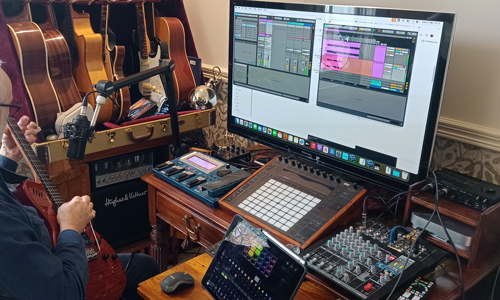
This is John at the end of our session testing out his new setup.
It took a bit of thinking to work out the optimal configuration for John’s gear. The chain ended up being:
- John plays guitar or sings
- Guitar signal processed by Roland GR55
- GR55 and mic connected to Komplete Audio 6 Interface
- Komplete Audio 6 Interface connected to iPad via USB OTG adaptor
- iPad runs the Loopy Pro app which records and loops John’s playing and singing
- Output of Loopy sent to USB mixer via Komplete Audio 6 Interface
- Mac connected to USB mixer
- Ableton running on Mac
- Ableton captures John’s recording session
If you need help working out any signal path problems in your home studio, please get in touch using our enquiry form.
Recent Reviews
Let’s Get Your System Running Smoothly.
No automated tickets, no waiting queues — just one-to-one help from an experienced music technology specialist. I’ll connect to your system remotely, identify the issue, and guide you through the fix.
Related Case Studies


We have 312 solved cases in our archive.
Browse all case studies →