
As part of a recent remote support session I was asked this question:
“When making a recording in Logic Pro I want to be able to ‘Punch-out’ so that my song keeps playing but not in record-mode. Is this possible?”
Yes it is. You need to switch the record settings to Record/Record Toggle. Hold Control on your keyboard and click on the record button on the transport bar (Red circle)
This brings up the Advanced Recording Commands menu. Move the Tick to Record/Record Toggle.
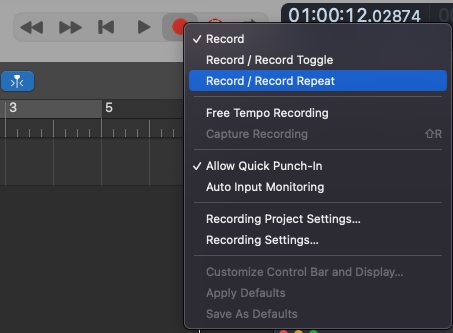
When you first press the red circle on the transport bar (or the R key on your QWERTY keyboard) Logic will start recording. When you press the circle or R key again Logic will keep playing but not in record mode. Press the space bar to stop playback completely.
Recent Reviews
Let’s Get Your System Running Smoothly.
No automated tickets, no waiting queues — just one-to-one help from an experienced music technology specialist. I’ll connect to your system remotely, identify the issue, and guide you through the fix.
