
Case Study
Resolving MIDI Conflicts Between Ableton Live and VirtualDJ
The Client’s Challenge
Digital audio workstations and DJ software often assume they have exclusive access to a connected MIDI controller. This creates issues when you use multiple programs, as I recently discovered when assisting a client.
A client was successfully using their Novation Launch Control XL to manage tracks and parameters within Ableton Live.
However, they also occasionally used VirtualDJ for playing non-production music. The problem arose when both applications were running: VirtualDJ automatically recognised the Launch Control XL and tried to interpret its MIDI messages. This resulted in erratic behaviour in both programs, making it impossible to reliably control Ableton Live. The client needed a way to tell VirtualDJ to simply ignore the controller.
Session Setup
I connected to the client’s system remotely using AnyDesk. This secure access allowed me to navigate directly into the settings menus of VirtualDJ and ensure the correct configuration changes were made without relying on verbal descriptions alone.
Diagnosis
The cause of the conflict was simple and common: the MIDI signals generated by the Novation Launch Control XL were being received and processed by both Ableton Live and VirtualDJ simultaneously.
Ableton Live was correctly assigned to use the controller, but because VirtualDJ has a default setting to recognise and map common controllers automatically, the messages were creating a feedback loop or causing unexpected actions in the DJ software.
The solution was not to stop the MIDI signals from being sent to VirtualDJ (that’s a system-level function), but to instruct VirtualDJ to disregard or un-map those incoming signals entirely.
The Fix
The fix was straightforward once we navigated to the correct settings area within VirtualDJ:
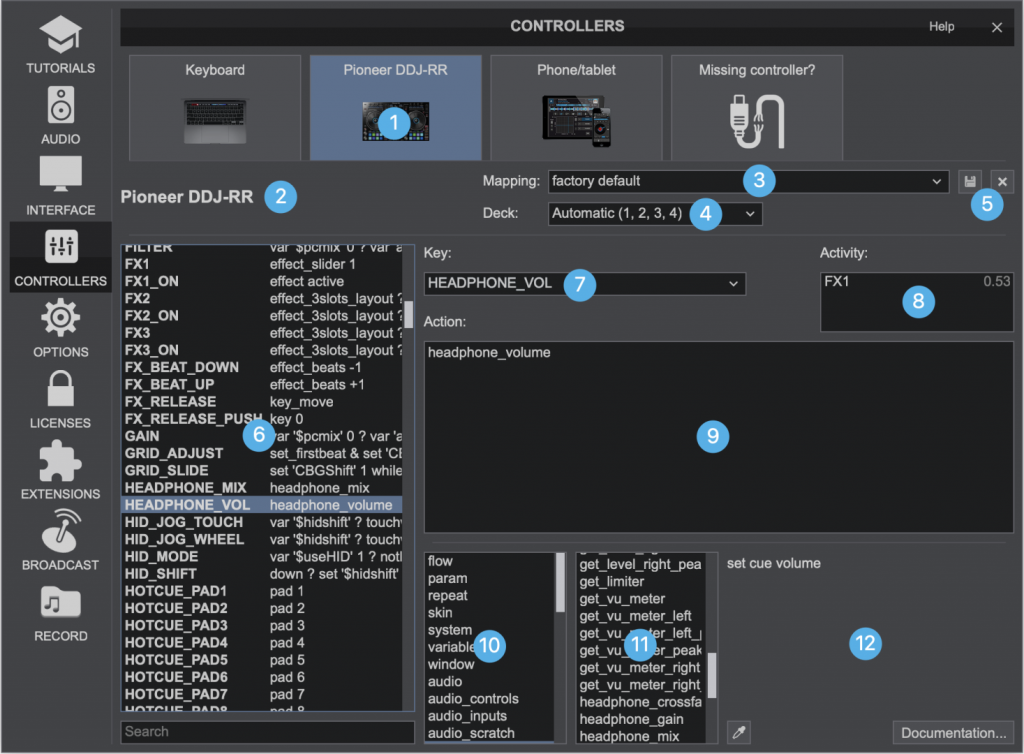
- Locate Controller Settings: We opened the Settings menu within VirtualDJ, then navigated to the Controllers section.
- Select Device: In the list of connected devices, we selected the Novation Launch Control XL.(1)
- Change Mapping: We then located the Mapping dropdown menu (which was set to a factory default).(3)
- No Mapping: Crucially, we changed the mapping setting from the default to “No Mapping”.
Result
By setting the mapping to “No Mapping,” the MIDI data from the Launch Control XL continued to be sent to the VirtualDJ software, but the program was instructed to completely ignore those messages. This resolved the conflict instantly, allowing the client to use the controller reliably with Ableton Live, regardless of whether VirtualDJ was open in the background.
Reflection
This case is a perfect example of a complex-sounding issue with a simple, software-level solution. MIDI conflicts are common when dealing with multiple DAWs, sequencers, or DJ programs. The key is to find the specific setting—usually in the application’s controller or preferences menu—that manages the interpretation of the MIDI signal, not just the connection itself. It’s always about routing and filtering.
Closing Thoughts
I help musicians and producers worldwide solve problems like this every day. If you’re struggling with MIDI conflicts or need to manage your controllers across multiple software applications, I’ll help you find the real cause and get you back to creating.
Let’s Get Your System Running Smoothly.
No automated tickets, no waiting queues — just one-to-one help from an experienced music technology specialist. I’ll connect to your system remotely, identify the issue, and guide you through the fix.
