
Hello Paul. I am running Logic on a 12-month-old, desktop Mac. Recently, I replaced my old interface (Behringer FCA 1616) with an Audient ID24 to work in conjunction with my Audient ASP800 (which was previously working fine with the Behringer). I can record, but the audio distorts. Can you help? Paul S
I received the above message and Paul S and I arranged a time to connect. Once we were speaking on the phone and Paul S showed me the problem on AnyDesk it didn’t take long to work out where things were going wrong.
Paul S’ recording setup was:
- Mic
- Audient ASP800 Mic Preamps
- Audient ID24 Audio Interface
- Mac
- Logic Pro
He needed to set a sample rate of either 44,100hz or 48,000hz and use the same sample rate throughout the chain. If he didn’t, he would either get sample rate error messages or digital distortion and glitches in his audio recordings.
Paul S and I discussed the pros/cons of different sample rate options and he decided that 44.1 would suit him best as that was how he had been recording the majority of his projects up to now.
We set the sample rate in all the devices and then made a few test recordings to check that audio was now recording correctly. We made some changes to his Logic template to confirm that new projects would be recorded at 44.1.
For the remainder of the hour’s session, I showed Paul S some things he might find helpful to get the best out of his setup.
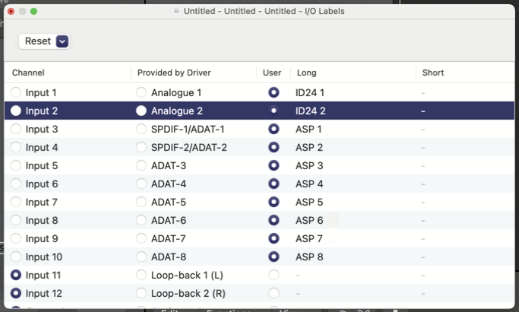
I showed Paul S how to use the I/O labels feature in Logic to set the display names of his Logic Pro inputs to match the channels of his ASP800.
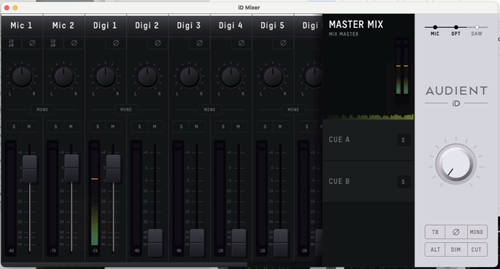
I showed Paul S how the Audient OSX mixer software allowed him to directly monitor his audio inputs. This can be a useful feature, but it’s important to know how to turn direct monitoring on/off to avoid doubling the sound when recording in Logic Pro.
At the end of the hour, Paul S kindly took the time to write me a Google review.

Paul S also sent me his Spotify artist link by email and I’ve been enjoying some of his tracks while writing this article. Sharing here:
Recent Reviews
Let’s Get Your System Running Smoothly.
No automated tickets, no waiting queues — just one-to-one help from an experienced music technology specialist. I’ll connect to your system remotely, identify the issue, and guide you through the fix.
More Case Studies
Recent problems solved for real clients.
Optimising Logic Pro CPU Usage for Large Orchestral Mixes
3 January 2026
Client’s Question
Why does Logic Pro keep crashing when I add plugins to my tracks?
Session Result
CPU load drastically reduced; mix workflow stabilised via bus routing.
Read Full Case Study Report: Optimising Logic Pro CPU Usage for Large Orchestral MixesPreparing for a Studio Hardware Installation
14 December 2025

Client’s Question
What cables do I need to connect my hardware synths to my mixer?
Session Result
Equipment audited, cable inventory confirmed, site visit planned.
Read Full Case Study Report: Preparing for a Studio Hardware InstallationMono Microphone Only in Left Speaker Fix in Logic Pro
14 December 2025

Client’s Question
Why is my mono mic input only coming out of the left speaker in Logic Pro?
Session Result
Mono input successfully centred by changing Logic Pro track format from Stereo to Mono.
Read Full Case Study Report: Mono Microphone Only in Left Speaker Fix in Logic ProManaging Native Instruments Komplete Libraries in Kontakt
12 December 2025

Client’s Question
How do I hide unwanted libraries in the Kontakt side pane?
Session Result
Unused libraries hidden, visual clutter removed.
Read Full Case Study Report: Managing Native Instruments Komplete Libraries in Kontakt