
My client JP booked me to visit his home studio recently to help resolve some of the CPU issues he was having when using third-party plug-ins in Logic Pro on his M1 Mac Studio.
At the start of the session, JP showed me his performance meter in Logic was maxing out on 4 of the 8 cores.
I suspected that the cause of the CPU overload might be the AU instruments and effects that were coded to run on Intel-CPU based Macs rather than the new Apple ARM-CPU Macs.
OSX’s activity monitor showed that the AUCompatibilityHostingService (Intel) was using far more CPU than Logic Pro or the AUHostingService (Apple) so this backed up my hypothesis.
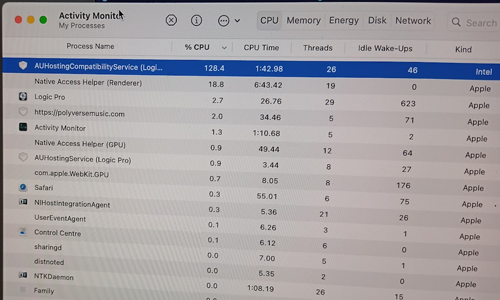
I checked through the version numbers of each third-party plug-in installed on JP’s Mac and checked online to determine if there were updates available for each one. I then downloaded and installed each update individually in order to test each as a separate variable in the investigation. After each update, I opened one of JP’s current large Logic Projects to see the difference each update had on the CPU meter.
Working through the plug-ins I updated:
- Dune 3 (Synapse Audio Software)
- Kick 2 (Sonic Academy)
- Omnisphere and Trillion (Spectrasonics)
- Avenger (Vengeance Production Suite)
The most effective change I made was the update to VPS Avenger from 1.8.5 to 1.8.6 which significantly improved CPU performance.
Before
After
I wanted to update Logic Pro, but OSX’s App Store didn’t give me the option to update Logic without updating the Mac’s version of OSX from 10.13.0 to 10.13.7. (I didn’t want to update OSX to a higher version, as this might create new problems.) The highest version of Logic we could run on OSX 10.13.7 was 10.11.0.
After all the updates, I opened one of JP’s large Logic projects to make a video of the improvements:
A huge improvement! JP could now run his project without CPU spikes.
If you have problems with any aspect of Logic and would like expert support please get in touch.
Recent Reviews
Let’s Get Your System Running Smoothly.
No automated tickets, no waiting queues — just one-to-one help from an experienced music technology specialist. I’ll connect to your system remotely, identify the issue, and guide you through the fix.
