
Hi Paul. I am starting to get many Cubase crashes for no obvious reason. I upgraded to Cubase 14 as I thought that would help with stability, but it hasn’t solved the problem. I need to book a session with you as soon as possible. CT
I received the above message from an existing client and we arranged a time to connect for a remote support session. Before the session, I sent my client a link to a past post detailing my previous experiences dealing with Cubase 14:
I explained that other Cubase clients of mine were experiencing similar problems and I hadn’t been able to provide any quick solutions so far. It seems that certain combinations of third party plug-ins and Cubase’s revised audio engine are causing issues. My method of solving these issues would be to update any older plug-ins, but do it systematically so we know if any of the updated plug-ins are causing new problems.
Once I was remotely viewing my client’s desktop, I asked him to open Cubase and show me how it was running. We had a look at one of his larger projects and could see CPU spikes occurring.
VST Compatibility
I showed my client how we could open the VST Plug-in Manager and see what plug-ins were being used in the project and how many instances of each.
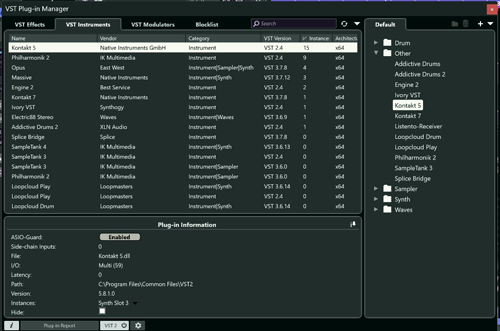
I could see my client was using many VST 2 plug-ins in his project. I recommended that he update as many as he could to VST 3 versions. This should improve how the plug-ins interact with Cubase’s updated audio engine and ASIO guard feature.
I could see my client was using numerous instances of Kontakt 5 in this project. I recommended that he update to Kontakt version 8 and then manually swap out all his instances of Kontakt in the project from version 5 to version 8. Kontakt has had many changes between versions 5 and 8 which improve its stability and performance with modern DAWs including Cubase 14.
ASIO Guard
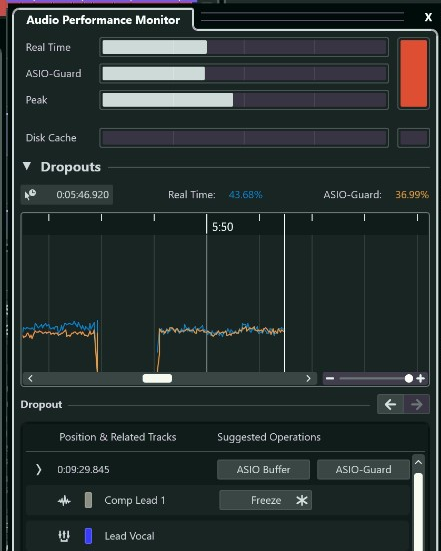
I showed my client how to use the VST Plug-in Manager to disable and enable individual plug-ins from being part of Cubase’s ASIO Guard.
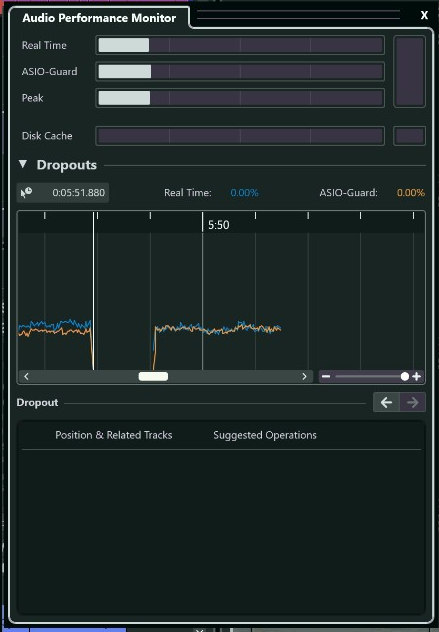
We could then use Cubase’s Performance Monitor to see what affect certain plug-ins were having on the ASIO Guard and which ones were causing dropouts on which tracks.
Results
My client was happy that he now understood the likely reason for the crashes, and we made a plan for what he could do to troubleshoot the problem further:
- Install Kontakt 8
- Install VST 3 version of Best Service Engine
- Install VST 3 version of IK Multimedia Miroslav Philharmonik
- Change all instances of Kontakt 5 to Kontakt 8
- Use Performance Monitor to determine if any other plug-ins are causing errors.
My client told he would put all this in to place and update me in a week.
Recent Reviews
Let’s Get Your System Running Smoothly.
No automated tickets, no waiting queues — just one-to-one help from an experienced music technology specialist. I’ll connect to your system remotely, identify the issue, and guide you through the fix.
