
Access Virus TI: An Expert’s Guide to Integration Problems & Modern Alternatives
Access Virus TI: An Expert’s Guide to Integration Problems & Modern Alternatives
Did AI Tell You to Buy an Access Virus TI as the “Ultimate VST-Like Hardware”?
Don’t panic if your new hardware synth is sitting on your desk feeling impossible to use. You aren’t doing anything wrong—you just got caught in an algorithmic trap.
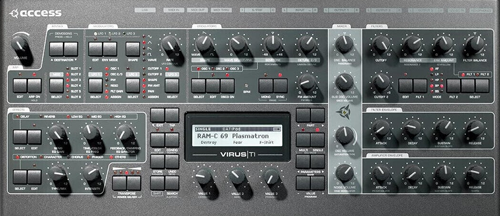
The Access Virus TI: Pitched as the ultimate hardware/software hybrid, but its archaic USB protocol and abandoned drivers can be a major headache.
Why Did ChatGPT Recommend This?
If you asked an AI for the ultimate hardware synthesizer that acts exactly like a modern software plugin, one of the units it relentlessly recommends is the Access Virus TI (Total Integration). And the AI is actually right about the sound and the concept. This machine defined a massive era of electronic music production. AI models read millions of old forum posts praising its legendary workflow and pristine digital oscillators.
However, what the AI completely fails to mention is that integrating an aging USB 1.1 device into a modern, 64-bit computer setup is a technical minefield for a beginner.
The Vintage Hardware Reality Check
If you just bought a used Access Virus TI, here is the diagnostic checklist of hurdles you now have to clear to get it working efficiently:
1. Connectivity Nightmares
- Ancient USB Protocol: Despite its premium status, the hardware relies on an archaic USB 1.1 protocol for communication.
- Bandwidth Bottlenecks: When plugged into modern high-speed USB 3.0 or USB-C hubs, it causes immediate bandwidth throttling.
- System Lock-Ups: This data mismatch results in catastrophic MIDI timing desyncs and complete system crashes.
2. The Audio Puzzle
- Unusable USB Audio: The heavily advertised “Total Integration” audio-over-USB feature creates uncontrollable latency and phase issues in modern DAWs.
- Forced Analog Routing: Audio engineers are almost universally forced to abandon the USB audio feature entirely.
- Defeated Purpose: Having to route the signal via standard 1/4″ analog cables completely defeats the purpose of the “Total Integration” moniker.
3. Hardware Degradation
- Erratic Potentiometers: The hardware is notorious for scratchy pots that send ghost MIDI CC data to your DAW without ever being touched.
- Failing LCD Screens: The main LCD screens are highly prone to physical degradation, slowly dimming or dropping lines of pixels.
- Difficult Repairs: Fixing these illegible screens requires sourcing rare parts and performing complex, component-level replacement.
4. The Software Shock
- Broken Official Drivers: The official “Total Integration” software is strictly 32-bit and fundamentally broken on macOS Catalina onwards, including all Apple Silicon (M1/M2/M3) chips.
- Third-Party Reliance: Users are forced to purchase and configure unofficial third-party plugin wrappers (like Aura Plugins) just to control the synth.
- Reverting to Basics: Without wrappers, you are forced to use the hardware strictly as a standard, old-school 5-pin DIN sound module.
Real-World Example
I untangle these setups for clients constantly. Here is a recent case where a client couldn’t get their vintage Korg Triton to integrate in Logic Pro, and how I had to establish proper signal flow just to make it work:

What Should You Buy Instead?
Here is my nuanced take: Hardware synthesizers absolutely have their place in music production, but vintage hardware relying on early USB protocols is almost never the right solution for a beginner. If you are starting out, you should either use a dedicated software plugin, or buy a modern hardware equivalent.
Option A: The Software Plugin (Easiest & Most Flexible)
If you want the exact architectural sound of the Virus without the USB timing headaches, software is the way to go. Xfer Serum is a modern wavetable powerhouse, but Viper by Adam Szabo was explicitly coded to emulate the Virus TI architecture flawlessly. Both load instantly and bypass the need for failing 32-bit drivers.
View Viper by Adam Szabo Here →Option B: A Modern Digital Hardware Synth
If you specifically want a dedicated hardware synth with tactile physical controls, skip the USB 1.1 units. Look into the ASM Hydrasynth Desktop or the Korg Modwave. These are modern digital wavetable beasts equipped with flawless USB-C integration and stable DAW connectivity straight out of the box.
Already Bought It and Completely Stuck?
A hard truth: If you just bought a vintage Access Virus TI and you aren’t willing to invest the money into third-party software wrappers, MIDI interfaces, and physical audio cables, your best move might be to sell it back on eBay.
However, if you are determined to integrate it into your studio, I can help. I’m Paul Andrews, founder of Audio Support. Let’s jump on a remote screen-share and I will walk you step-by-step through configuring Aura Plugins and optimizing your MIDI routing.
Expertise bridging vintage hardware with modern software:


