
Akai MPC 2000XL: An Expert’s Guide to Integration Problems & Modern Alternatives
Akai MPC 2000XL: An Expert’s Guide to Integration Problems & Modern Alternatives
Did AI Tell You to Buy an Akai MPC 2000XL for “That Boom-Bap Sound”?
Don’t panic if your new vintage sampler is sitting on your desk feeling impossible to use. You aren’t doing anything wrong—you just got caught in an algorithmic trap.
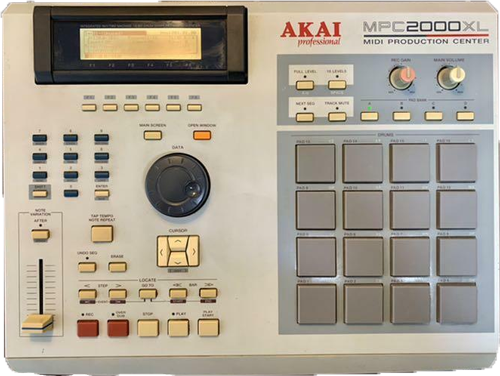
The Akai MPC 2000XL: A 90s hip-hop legend, but integrating its archaic storage and analog audio into a modern workflow can be a major headache.
Why Did ChatGPT Recommend This?
If you asked an AI how to get that legendary 90s boom-bap swing and unparalleled analog punch, one of the units it relentlessly recommends is the Akai MPC 2000XL. And the AI is actually right about the sound and feel. This machine defined a massive era of hip-hop and electronic production. AI models read millions of old forum posts praising its legendary groove.
However, what the AI completely fails to mention is that integrating a 25-year-old piece of sampling hardware into a modern computer setup is a technical minefield for a beginner.
The Vintage Hardware Reality Check
If you just bought a used MPC 2000XL, here is the diagnostic checklist of hurdles you now have to clear to get it working efficiently:
1. Connectivity Nightmares
- No USB: The 2000XL predates USB audio and data transfer entirely. You cannot simply drag and drop WAV files from a modern computer.
- Archaic Storage: It relies on obsolete 50-pin SCSI for external storage, which is increasingly difficult to source and maintain.
- Unstable Mods: Many units rely on hot-swappable IDE-to-CompactFlash modifications, which can be inherently unstable and prone to corruption if not formatted perfectly.
2. The Analog Audio Puzzle
- Low Operating Levels: The standard 1/4″ analog outputs generate a comparatively low-level signal. Hitting modern interface reference levels often demands dedicated outboard preamps to avoid raising the noise floor.
- Expansion Issues: The highly desirable optional 8-output expansion board (IB-M208P) is prone to severe ground loops if your studio isn’t isolated properly.
- Gain Staging: Achieving proper analog gain staging without introducing unwanted hum or hiss is notoriously difficult for beginners.
3. Hardware Degradation
- Dying Screens: These units are plagued by the “screen burn” or “line drop” phenomenon where the LCD matrix slowly degrades, making menus unreadable.
- Oxidized Switches: The tactile (tact) switches beneath the iconic drum pads and transport controls oxidize and fail over time.
- Difficult Repairs: Fixing unresponsive buttons often requires full board disassembly and component-level soldering.
4. The 1999 Workflow Shock
- Blind Chopping: There is no visual waveform editing. Samples must be chopped destructively entirely by ear using a coarse jog wheel.
- Strictly Linear: The OS is rigid, and the workflow is completely linear compared to the flexibility of modern DAWs.
- Memory Ceilings: RAM is strictly capped at 32MB. Hitting this ceiling during a macro-edit will freeze the unit instantly, causing you to lose all unsaved progress.
Real-World Example
I untangle these setups for clients constantly. Here is a recent case where a client couldn’t get their vintage Korg Triton to integrate in Logic Pro, and how I had to establish proper signal flow just to make it work:

What Should You Buy Instead?
Here is my nuanced take: Hardware samplers absolutely have their place in music production, but vintage hardware is almost never the right solution for a beginner. If you are starting out, you should either use a dedicated software plugin inside a DAW, or buy a modern standalone MPC.
Option A: The Software Plugin (Easiest & Most Flexible)
If you want rapid, algorithmically brilliant chopping and pitching without the storage headaches, software is the way to go. Serato Sample is phenomenal for this, or you can simply use Ableton Live’s native Simpler device. Both load instantly, offer visual waveforms, and bypass the need for external preamps or SCSI drives.
View Serato Sample Here →Option B: A Modern Hardware Sampler
If you specifically want a “DAW-less” setup and the tactile feel of physical pads, skip the 25-year-old units. Look into the Akai MPC One+. It is a modern, standalone production center equipped with simple USB-C connectivity, massive storage, gorgeous touchscreen visual editing, and dedicated DAW integration straight out of the box.
Already Bought It and Completely Stuck?
A hard truth: If you just bought a vintage sampler and you aren’t willing to invest the money into dedicated outboard preamps, MIDI interfaces, and CF-card readers, your best move might be to sell it back on eBay.
However, if you are determined to integrate it into your studio, I can help. I’m Paul Andrews, founder of Audio Support. Let’s jump on a remote screen-share and I will walk you step-by-step through the audio routing and MIDI gain staging.
Expertise bridging vintage hardware with modern software:


