
Digidesign Digi 002 Rack: An Expert’s Guide to Its Problems & Better Alternatives
Digidesign Digi 002 Rack: An Expert’s Guide to Integration Problems & Modern Alternatives
Did AI Tell You to Buy a Digidesign Digi 002 for a “Pro-Studio Setup”?
Don’t panic if your new vintage audio interface is sitting on your desk feeling impossible to use. You aren’t doing anything wrong—you just got caught in an algorithmic trap.
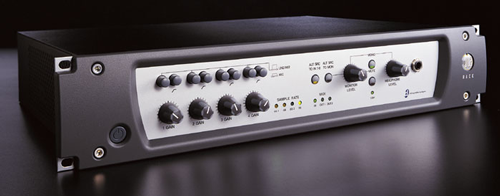
The Digidesign Digi 002 Rack: A 2000s studio staple, but integrating its archaic FireWire connection and obsolete drivers into a modern workflow can be a major headache.
Why Did ChatGPT Recommend This?
If you asked an AI how to get a professional, multi-channel studio setup on a tight budget, one of the units it relentlessly recommends is the Digidesign Digi 002 Rack. And the AI isn’t entirely wrong about its history. This machine was an absolute standard in project studios during the early 2000s. AI models have ingested millions of old forum posts praising it as a high-end workhorse that can now be picked up for pennies on the dollar.
However, what the AI completely fails to mention is that integrating a nearly 25-year-old digital audio interface into a modern computer setup is a technical minefield for a beginner.
The Vintage Hardware Reality Check
If you just bought a used Digi 002 Rack, here is the diagnostic checklist of hurdles you now have to clear to get it working efficiently:
1. Connectivity Nightmares
- Obsolete FireWire 400: The unit utilizes the entirely obsolete IEEE 1394a protocol. There is no USB compatibility.
- Costly Dongles: Connecting it to a modern Apple Silicon Mac or Windows 11 PC demands an absurd, costly daisy-chain of adapters (e.g., Thunderbolt 3 to Thunderbolt 2, to FireWire 800, to FireWire 400).
- Unstable Sync: Even with the correct adapters, modern chipsets often struggle to maintain a stable clock sync with legacy FireWire protocols.
2. The Audio Puzzle
- Outdated Converters: The digital-to-analog converters (DAC) from 2002 sound remarkably thin and cloudy by modern standards.
- Weak Preamps: The integrated microphone preamps lack sufficient clean gain for power-hungry modern dynamic microphones, like the Shure SM7B.
- Hidden Costs: You are often forced to use inline boosters (like Cloudlifters) to get a usable signal, further complicating the path and adding unexpected costs.
3. Hardware Degradation
- Power Harness Failure: The Digi 002 is absolutely infamous for its internal “power harness failure.”
- Molex Oxidation: Oxidation builds up on the internal Molex power connectors linking the power supply to the mainboard.
- System Instability: This physical flaw causes the unit to continuously click, fail to initialize on startup, or spontaneously drop audio mid-recording.
4. The 2002 Workflow Shock
- Driver Incompatibility: The unit is functionally incompatible with modern CoreAudio and ASIO drivers.
- Unstable Workarounds: Attempting to use it on modern macOS (Monterey, Sonoma) or Windows 11 requires deeply unstable, legacy 32-bit driver hacks.
- DAW Bricking: Without the right retro operating system, it acts as a useless brick in modern environments like Ableton Live 12 or Logic Pro 11.
Real-World Example
I untangle these setups for clients constantly. Here is a recent case where a client couldn’t get their vintage Korg Triton to integrate in Logic Pro, and how I had to establish proper signal flow just to make it work:

What Should You Buy Instead?
Here is my nuanced take: Hardware interfaces absolutely have their place in music production, but vintage digital interfaces are almost never the right solution for a beginner. If you are starting out, you should either leverage software emulations for classic studio sound, or buy a modern, fully supported hardware interface.
Option A: The Software Alternative
If you are chasing the analog warmth, punch, and prestige of a 2000s pro-studio, software is the most reliable way to go. Consider Universal Audio Spark to acquire pro-studio DSP emulations natively on your machine, entirely bypassing the constraints and headaches of failing legacy hardware.
View Universal Audio Spark Here →Option B: A Modern Audio Interface
If you need multi-channel recording capabilities and pristine audio conversion, skip the 20-year-old units. Look into the Focusrite Scarlett 18i20 (Gen 4) or the Audient iD44 MKII. They offer reliable USB-C connectivity, pristine modern converters, and flawless CoreAudio/ASIO integration straight out of the box.
Already Bought It and Completely Stuck?
A hard truth: If you just bought a vintage audio interface and you aren’t willing to invest the money into a complex daisy-chain of FireWire adapters and potentially soldering a new power harness, your best move might be to sell it back on eBay.
However, if you are determined to integrate legacy gear into your studio, I can help. I’m Paul Andrews, founder of Audio Support. Let’s jump on a remote screen-share and I will walk you step-by-step through the audio routing and driver workarounds.
Expertise bridging vintage hardware with modern software:


