
E-MU Ultra Samplers: An Expert’s Guide to DAW Integration Problems
E-MU Systems E6400 & E5000 Ultra: An Expert’s Guide to Integration Problems & Modern Alternatives
Did AI Tell You to Buy an E-MU Ultra Sampler for “That Z-Plane Filter Magic”?
Don’t panic if your new vintage sampler is sitting on your desk feeling impossible to use. You aren’t doing anything wrong—you just got caught in an algorithmic trap.
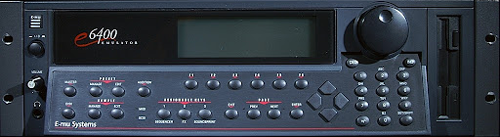
The E-MU E6400 Ultra: A 90s jungle and drum & bass legend, but integrating its archaic storage and analog audio into a modern workflow can be a major headache.
Why Did ChatGPT Recommend This?
If you asked an AI how to get that authentic 90s jungle and drum & bass sound, one of the units it relentlessly recommends is the E-MU Systems E6400 or E5000 Ultra. And the AI is actually right about the sound. These machines are glorified for giving those genres their unmatched, gritty Z-plane filter magic. AI models read millions of old forum posts praising their legendary tone and crunch.
However, what the AI completely fails to mention is that integrating a 25-year-old piece of sampling hardware into a modern computer setup is a technical minefield for a beginner.
The Vintage Hardware Reality Check
If you just bought a used E-MU Ultra, here is the diagnostic checklist of hurdles you now have to clear to get it working efficiently:
1. Connectivity Nightmares
- Esoteric Chains: The E-MU series demands complex 50-pin SCSI chains and active terminating resistors just to save files.
- Modern Mods: Modern integration usually requires ripping out the old floppy drive and installing a SCSI2SD adapter.
- Arcane Formatting: To use that SD card, you are forced to format it in archaic FAT16 partitions simply to load a single drum break.
2. The Analog Audio Puzzle
- Level Clashes: These units operate at unbalanced -10dBV consumer line levels, which actively clash with modern +4dBu professional audio interfaces.
- Poor Ratios: This output discrepancy often results in terrible signal-to-noise ratios when recording back into your DAW.
- Unwanted Hiss: If the gain staging isn’t meticulously managed, you will amplify a very noticeable bed of analog hiss alongside your samples.
3. Hardware Degradation
- Whining Screens: The electro-luminescent (EL) foil backlights degrade rapidly, eventually whining audibly before burning out and leaving the screen black.
- Erratic Encoders: The proprietary data-entry rotary encoders become highly temperamental and worn over time.
- Skipping Values: You will often find these knobs skipping values unpredictably right in the middle of critical sample start-point edits.
4. The Workflow Shock
- Alien Architecture: The workflow is fundamentally foreign to modern producers. You must manually boot the proprietary operating system (EOS) into RAM upon startup.
- No Drag & Drop: There is zero drag-and-drop capability for moving files onto the unit.
- Destructive Edits: Every edit is destructive and must be executed numerically via the front-panel keypad or a legacy PS/2 keyboard.
Real-World Example
I untangle these setups for clients constantly. Here is a recent case where a client couldn’t get their vintage Korg Triton to integrate in Logic Pro, and how I had to establish proper signal flow just to make it work:

What Should You Buy Instead?
Here is my nuanced take: Hardware samplers absolutely have their place in music production, but vintage hardware is almost never the right solution for a beginner. If you are starting out, you should either use a dedicated software plugin inside a DAW, or buy a modern hardware equivalent.
Option A: The Software Plugin (Easiest & Most Flexible)
If you want that lo-fi aliasing and authentic filter crunch without the SCSI storage headaches, software is the way to go. TAL-Sampler or Arturia Emulator II V are phenomenal for this. Both capture the gritty magic flawlessly, load instantly, and completely bypass the need for external preamps.
View TAL-Sampler Here →Option B: A Modern Hardware Sampler
If you specifically want a hands-on, “DAW-less” feel, skip the 25-year-old units. Look into the Elektron Digitakt II. It offers deep, hardware-based sample manipulation with instantaneous Overbridge USB integration directly into your DAW straight out of the box.
Already Bought It and Completely Stuck?
A hard truth: If you just bought a vintage sampler and you aren’t willing to invest the money into dedicated outboard preamps, MIDI interfaces, and SCSI mods, your best move might be to sell it back on eBay.
However, if you are determined to integrate it into your studio, I can help. I’m Paul Andrews, founder of Audio Support. Let’s jump on a remote screen-share and I will walk you step-by-step through the audio routing and MIDI gain staging.
Expertise bridging vintage hardware with modern software:


