Waves Central PC Login Issue Solved: Default Browser Not Set
Panic Index // FRUSTRATED
Technical Depth // CONFIGURATION
RESOLVED
Target Environment
Windows + Waves Central
Reported Symptom
“Waves Central reported 'no internet connection' and failed to log in, despite a working connection.”
Hi Paul. I need help with Waves Central 15.3.2. It won’t log me in and I don’t know why. Tyson
Answered by Paul Andrews, Audio Support.
I received the above message from Tyson and we arranged to connect for a remote support session the following day.
Once Tyson and I were speaking on the phone and I was looking at his screen, he showed me the error that was appearing whenever he tried to launch Waves Central:
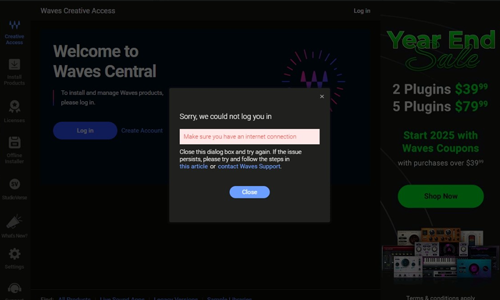
Sorry, we could not log you in: Make sure you have an internet connection
Solution
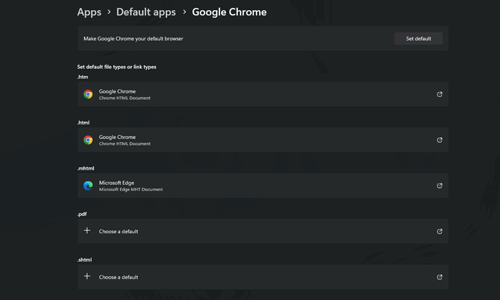
Waves Central uses a browser-based log-in system. Once launched the app opens a separate browser window (Chrome, Edge, Firefox etc) for the user to enter their username and password. On PC, the user can select which browser is used to launch web links in Settings – Default Apps.
The problem was that Tyson didn’t have any browser assigned as the default app for web links. I set Chrome as the default for all web content.
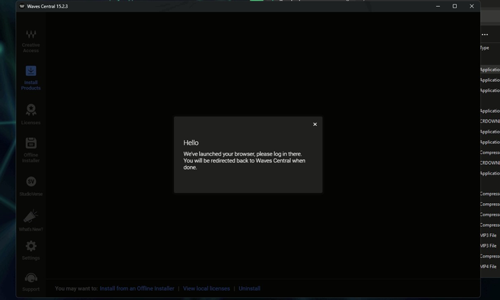
The next time we tried to launch Waves Central, it launched Chrome and took us to the Waves’ website.
Tyson entered his Username and Password and when he closed the browser, Waves Central was now logged in.
Tyson thanked me for my help, and I let him know I was around for any similar problems in the future.
If you need help with Waves Central or any other music application on your Mac or PC, please Get in Touch.
Trustindex verifies that the original source of the review is Google.
Paul is absolutely fantastic! an absolutely amazing help to me setting up my audio equipment and a lovely guy also! would 100% recommend!
Matt Masters
2026-01-25
Trustindex verifies that the original source of the review is Google.
Had a follow up session face to face this time where Paul came to my studio. I had a long list of requirments and we got through all of them during the 5 hour session. Very knowledgeable and able to answer all of my questions. Thanks so much for your help! Matt
hg2008
2026-01-20
Trustindex verifies that the original source of the review is Google.
Paul is both extremely knowledgeable, experienced and skilled at solving Pro Tools problems for musicians like me but also patient and good humoured. I cannot recommend his services highly enough.
Aria Editions
2026-01-15
Trustindex verifies that the original source of the review is Google.
Fantastic help from Paul in getting started on Cubase and setting up audio and MIDI. Highly recommended.
Patrick
2025-12-12
Trustindex verifies that the original source of the review is Google.
Paul was so helpful, friendly and professional. He solved my problems and made sure I understood how he'd solved it so I wouldn't have problems later on. Fantastic.
Lindsay Legane
2025-11-26
Trustindex verifies that the original source of the review is Google.
I have been trying to fix my Computer problem between my Yamaha 816C Audio Interface and Cubase 15 for a week and failed. Then I came across Paul. Paul has been brilliant, the problem was solved within the hour. I'm a happy client. I would definitely recommend Paul.
Robert Douglas Wilford
2025-11-19
Trustindex verifies that the original source of the review is Google.
Clear concise calm advice, sit back and let the tech wizard do it. He did in 1 hour what I couldn't do in 3 weeks working via email with other support groups. Many thanks Paul.
Timothy Thomas
2025-11-13
Trustindex verifies that the original source of the review is Google.
Rapid response to my call for help. Booked quickly. Healed my (big) problem within the hour meeting. Appointment started and ended right on schedule. Very knowledgeable. Highly recommend.
Geoff Campbell
2025-11-04
Trustindex verifies that the original source of the review is Google.
My request was complex, but Paul resolved it. To link to an audio interface, then Zoom for guitar lessons that could be seen on video with the guitar and backing track meshed for recording. While at the same time being able to see/hear my tutor via webcam. And then, when not so connected, to run a simple Zoom call or listen to a streaming audio service and hear the audio/video through the PC speakers. I wish to connect to a friend to jam via Zoom. When I've mastered what Paul has set up today I'll be back to route that connection. And then it's onto my DAW for recording. It's complex as I say but Paul understands it. Today's session was so valuable. You can read all you like and watch YouTube instruction but it's nothing like Paul taking control. We had blips too and Paul resolved them. A*
will angeloro
2025-10-23
Trustindex verifies that the original source of the review is Google.
Had a very perplexing problem. Found a work around, He has tremendous knowledge of midi and audio. Was clear with every step of the investigation. I couldn't recommend any higher
Let’s Get Your System Running Smoothly.
No automated tickets, no waiting queues — just one-to-one help from an experienced music technology specialist. I’ll connect to your system remotely, identify the issue, and guide you through the fix.