
This case study highlights how Audio Support quickly resolved a critical “no audio recording” issue for long-time Cubase user Peter Boulton, caused by a common macOS privacy setting. Beyond the core fix, the session provided invaluable guidance on efficient file management and robust backup strategies, getting Peter back to creating music in his home studio.
Client’s Initial Request
Peter Boulton, a dedicated Cubase user with years of experience, reached out to Audio Support facing a critical roadblock after upgrading his studio. His initial inquiry clearly articulated the situation:
“I’ve recently upgraded my studio set up from Cubase 10.5 Artist running on a 2013 iMac 16GB RAM, 2TB SSD. I had no problems really other than the iMac often had memory issues as my music got more complicated with more samples etc. I’ve upgraded the Mac to an M4 Mac Mini with 24GB RAM and 2TB of SSD memory. I also upgraded to Cubase 14 Pro. The issue I’m finding is in simply recording a new audio track (i.e. live instrument). I’ve checked my set up a number of times, but just can’t figure out what I’m missing?? I have a Behringer Xenyx mixing desk, a Focusrite 4i4 3rd Gen digital interface. I can see the signal being received by the mixer and the 4i4, but nothing in Cubase. Can you help?”
Despite his thorough checks and a perfectly functional setup with his previous Cubase 10.5, Cubase 14 Pro was preventing him from recording any live instruments – a significant roadblock to his music production.
Arranging a Remote Support Session & Expert Diagnosis
A remote support session was scheduled via our online booking system to diagnose and resolve Peter’s audio recording issue. Based on his description and the specific symptoms (new Mac, new Cubase version, older Cubase working, signal reaching interface but not DAW), I had a strong suspicion about the underlying cause, but a systematic approach was vital to confirm.
Identifying the Problem: macOS Privacy & Security Settings
The challenge was that while audio was clearly reaching Peter’s Mac via his Focusrite 4i4 3rd Gen interface, Cubase 14 wasn’t “seeing” it. My diagnostic steps included:
- Audio Interface Check: I first opened his Focusrite Control Panel. The active green audio activity indicators confirmed audio was correctly entering his Mac from his Focusrite Scarlett interface, ruling out an issue with the hardware or its drivers.
- Cubase Internal Settings: Next, I delved into Cubase 14’s internal settings. I checked the Device Setup menu to ensure the audio drivers were correctly selected (Focusrite). I then verified the Audio Connections window, confirming the inputs and outputs were correctly configured to use the Scarlett’s physical inputs. Despite these checks, no audio signal was registering within Cubase itself.
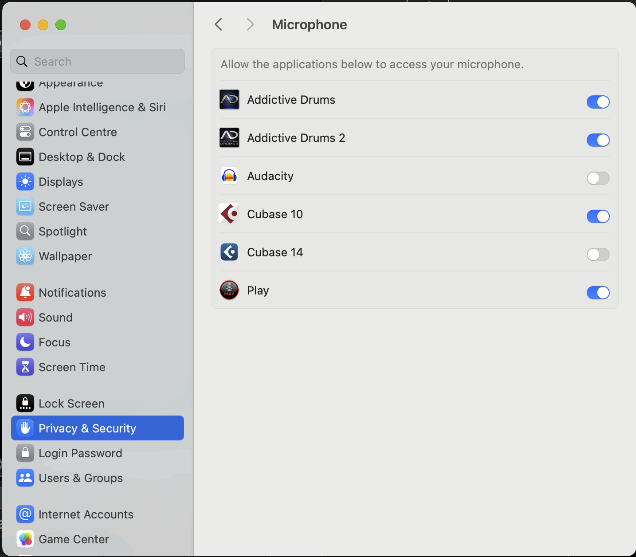
- The Root Cause (Expert Suspicion Confirmed): As suspected, the issue pointed to macOS’s enhanced privacy and security features. Upon opening the Mac’s System Settings > Privacy & Security > Microphone, I immediately spotted that Cubase 14 was unchecked, meaning it was being blocked from accessing the microphone input. This is a common oversight on new macOS installations or with new application versions.
The Solution: Granting Microphone Access & Providing Comprehensive Studio Advice
The primary fix was straightforward: simply checking the box to allow Cubase 14 access to the microphone in macOS System Settings. This instantly resolved the audio recording issue, and Peter was able to record in Cubase 14 without problems.
However, recognizing that the fix itself was quick, and to ensure Peter received full value for his hour-long session, I provided additional crucial support:
- Cubase Project & Audio File Management: I went through Peter’s Cubase project filing system with him. We systematically ensured his project files and their associated audio files were correctly saved together in their respective project folders. I identified and rectified a few instances where audio files had been inadvertently saved outside their project folders, which can lead to “missing file” issues later.
- Backup Verification: I provided essential advice on backup best practices and double-checked his Time Machine setup, confirming it was correctly backing up his crucial audio files and projects.
Concluding the Remote Support Session
Peter was highly satisfied his critical audio recording issue in Cubase 14 was resolved. He deeply appreciated the proactive approach to use the remaining session time effectively, gaining valuable insights into robust file management and backup strategies. This additional support helped him establish a more secure and organized workflow for his ongoing music production.
Client’s Experience & Public Endorsement
Peter’s gratitude was evident not only in his satisfaction during the session but also in a fantastic public review he left:
“Absolutely exactly what I needed. Paul was just so helpful in breaking the mysteries of why some of the functions in Cubase 14 Pro weren’t working for me. So friendly and knowledgeable. Thank you so much for your time. I will definitely come back to you if I need any further help.”
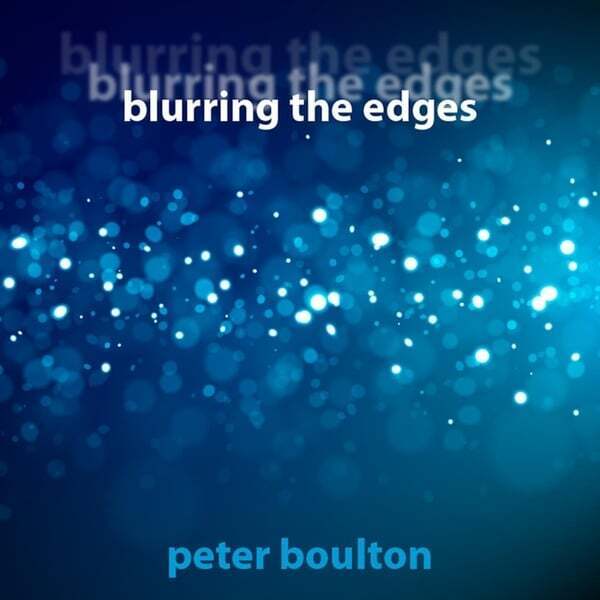
It was a pleasure to hear from Peter after the session and to receive a link to his music. I’ve been writing this article with his excellent album, ‘Blurring the Edges,’ playing in my headphones. My favourite track so far has been “Push and Pull” which builds up layers of effected guitars to produce a rich soundscape. It’s rewarding for me to know that my help has enabled him to continue work on his next album.
Key Takeaways:
- The Problem: Inability to record audio in Cubase 14 on a new M4 Mac Mini with a Focusrite 4i4 3rd Gen interface, despite Cubase 10.5 working fine.
- The Diagnosis: macOS Privacy & Security settings were blocking Cubase 14’s access to the microphone input.
- The Solution: Granting microphone access to Cubase 14 in macOS System Settings, combined with comprehensive advice on Cubase file management and Time Machine backup verification, ensuring full session value and getting Peter back to creating.
Expert Insight
Modern operating systems, particularly macOS, have robust security features that can sometimes inadvertently block DAW functionality. While frustrating, issues like this highlight the importance of methodical troubleshooting, starting from system-level permissions. Beyond the immediate fix, leveraging session time to address foundational aspects like file organization and backups provides immense long-term value, preventing future headaches for clients and empowering them to focus on their creativity.
Hear Peter’s Music
It’s inspiring to see clients like Peter get back to their passion. You can listen to his music and hear the fantastic results of his home studio work here: https://peterboulton.hearnow.com/blurring-the-edges
Get support for similar problems
Are you facing audio recording issues in Cubase or other DAWs after a macOS update or new computer? Do you need help with file management, backups, or optimizing your studio workflow?
Recent Reviews
Let’s Get Your System Running Smoothly.
No automated tickets, no waiting queues — just one-to-one help from an experienced music technology specialist. I’ll connect to your system remotely, identify the issue, and guide you through the fix.
