
Hi Paul
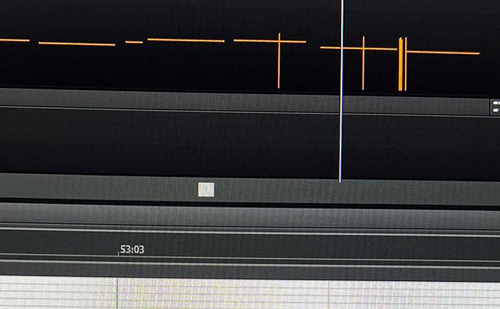
These vertical lines have randomly appeared on my timeline. It seems wheel messages are randomly inserted. Can you help me please?
James
I received the above message from James and we arranged to connect later that day. Once we were speaking on the phone and had our remote connection set up via AnyDesk, James showed me the problem. As he was recording his MIDI parts in Sonar using his controller keyboard, he was noticing small changes to the sounds of his synths randomly occurring. When we opened the MIDI editor in Sonar, we could see the that these changes related to small MIDI messages that were appearing in his MIDI recordings.
I had worked for James recently, helping him migrate his studio setup to a new PC. I knew that James had a relatively simple setup with just one MIDI input device, an Alesis V49 controller keyboard and this was likely to be the cause of the issue.
In recent years, I’ve seen problems with budget MIDI controllers made by brands such as Alesis and M-Audio having issues with the pitch and mod wheels sending data when not being touched. This is caused by a fault in the sensitive electronic sensors that records the mechanical movement of the wheels. I saw this exact issue recently with another client using Logic Pro and an M-Audio keyboard.
The most likely explanation is a build up of dust around the sensors and this can be easily solved by blowing some air inside the keyboard using a thin nozzle on a can of compressed air. I showed James where he could order a can of air online.
If the compressed air didn’t solve the problem, then there was a fault in the hardware of the keyboard and it would need to be repaired/replaced. Because of the budget cost of the keyboard, replacement was the most likely solution.
James told me he didn’t really use the pitch and mod wheels, so I showed him how he could keep using his keyboard by filtering out the pitch and MIDI Controller information. This can be done simply by unticking boxes in Sonar’s Preferences.
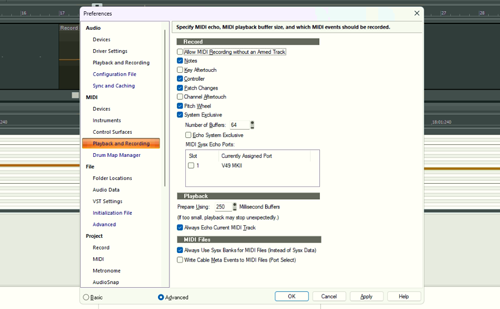
Now the pitch and mod wheel data were being ignored by Sonar, James could carry on recording with his controller keyboard straight away. When the can of compressed air arrived, James could try blowing the dust out and deactivating the filters. James was happy that he now understood why the problem was occurring and that he had two methods to work around the issue.
Thanks very much Paul. Superb help as always! James B
Recent Reviews
Let’s Get Your System Running Smoothly.
No automated tickets, no waiting queues — just one-to-one help from an experienced music technology specialist. I’ll connect to your system remotely, identify the issue, and guide you through the fix.
More Case Studies
Recent problems solved for real clients.
Optimising Logic Pro CPU Usage for Large Orchestral Mixes
3 January 2026

Client’s Question
Why does Logic Pro keep crashing when I add plugins to my tracks?
Session Result
CPU load drastically reduced; mix workflow stabilised via bus routing.
Read Full Case Study Report: Optimising Logic Pro CPU Usage for Large Orchestral MixesPreparing for a Studio Hardware Installation
14 December 2025

Client’s Question
What cables do I need to connect my hardware synths to my mixer?
Session Result
Equipment audited, cable inventory confirmed, site visit planned.
Read Full Case Study Report: Preparing for a Studio Hardware InstallationMono Microphone Only in Left Speaker Fix in Logic Pro
14 December 2025

Client’s Question
Why is my mono mic input only coming out of the left speaker in Logic Pro?
Session Result
Mono input successfully centred by changing Logic Pro track format from Stereo to Mono.
Read Full Case Study Report: Mono Microphone Only in Left Speaker Fix in Logic ProManaging Native Instruments Komplete Libraries in Kontakt
12 December 2025

Client’s Question
How do I hide unwanted libraries in the Kontakt side pane?
Session Result
Unused libraries hidden, visual clutter removed.
Read Full Case Study Report: Managing Native Instruments Komplete Libraries in Kontakt