CASE ID: #8319 RESOLVED
LOG DATE: NOV 2024

Lesson on Using Automation in Logic Pro

Panic Index KNOWLEDGE GAP
Technical Depth WORKFLOW

Target Environment

macOS + Logic Pro X

Reported Symptom

“Client required dynamic parameter changes (volume, tone) over the duration of a composition.”

Consultant’s Assessment

Root Cause / Concept User unfamiliarity with DAW automation principles, including Track vs. Region modes and parameter assignment.
Outcome Educated client on the complete automation toolset, enabling dynamic mix control and creative sound shaping.
Intervention Risk
LOW

Hi Paul. I have some questions about some functions in Logic Pro X. Can you help me? – Laurie

I received the above message from Laurie and we arranged to connect for a remote support lesson.

Once we were connected via WhatsApp and AnyDesk, Laurie explained that he wanted instrument sounds to change in volume and tone throughout the duration of his song and I told him the best way to do that was with automation. We then spent our lesson time covering:

  • Overview of how automation works in Logic Pro
  • The difference between Track and Region automation
  • How to select a parameter to be automated (volume, mute, pan etc)
  • How to edit automation with cursor tools
  • How to record automation in real time
  • The Reading and Writing options when using automation
  • How to assign MIDI controller faders to automation parameters
  • How to automate parameters within Insert FX (Reverb/delay levels, cut-off, etc)
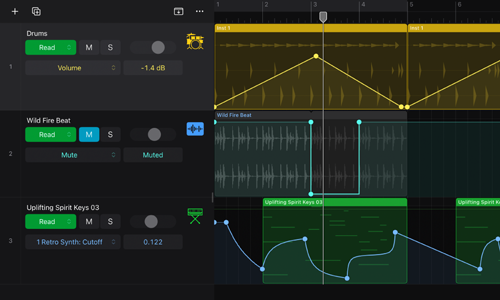
Logic Pro Automation

At the end of the session, Laurie now had a strong grasp of the options for automation in Logic and was confident using them for himself. He kindly took the time to leave me this nice review:

‘…helpful in soving problems with Logic Pro…’
Categories: , , ,

No automated tickets, no waiting queues — just one-to-one help from an experienced music technology specialist. I’ll connect to your system remotely, identify the issue, and guide you through the fix.
Recent problems solved for real clients.

Client’s Question

How do I move my Ableton User Library out of OneDrive?

Session Result

Ableton library relocated, OneDrive space recovered.

Read Full Case Study Report: Fixing the Ableton OneDrive Conflict on Windows 11
Case Study: Pro Tools 2025.12 Crash & The OneDrive Phantom Folder

Client’s Question

Why is Pro Tools crashing on Windows 11 when the splash screen reaches “Initializing MIDI Engine”?

Session Result

Resolved by reinstalling OneDrive, properly disabling folder backup to restore local paths, and then safely removing the cloud service.

Read Full Case Study Report: Case Study: Pro Tools 2025.12 Crash & The OneDrive Phantom Folder
Case Study: Logic Pro Freezing During Audio Unit Scan (Halo 2 / DH Plugins)

Client’s Question

Why is Logic Pro 11.1.2 freezing after I installed the Halo 2 plug-in?

Session Result

The “Beast Mode” expansion pack of Halo2 was uninstalled. This restored the functionality of the base Halo 2 plugin and allowed Logic Pro to open and operate without crashing

Read Full Case Study Report: Case Study: Logic Pro Freezing During Audio Unit Scan (Halo 2 / DH Plugins)
Optimising Logic Pro CPU Usage for Large Orchestral Mixes

Client’s Question

Why does Logic Pro keep crashing when I add plugins to my tracks?

Session Result

CPU load drastically reduced; mix workflow stabilised via bus routing.

Read Full Case Study Report: Optimising Logic Pro CPU Usage for Large Orchestral Mixes