Category: DAW

  • Visiting a Guitarist to Help With His Logic Pro Recording Setup

    Visiting a Guitarist to Help With His Logic Pro Recording Setup

    Hi Paul. I’m using the following gear; Logic Pro X, Apogee Symphony, MPC X, Fractal Audio AXE FX2 XL and I’m having problems with getting everything connected. Can we arrange a visit for you to help me? – Joe

    I received the above enquiry from Joe and we arranged a time for me to visit him the following week. Before the session, Joe and I discussed cabling for his setup via email.

    On the day of the session, I arrived at Joe’s and we spent the morning covering:

    • Connecting the Fractal Audio AXE FX2 XL+ to Apogee Symphony via SPIDF cable
    • Configuring the Apogee Symphony software
    • Making test recordings in Logic Pro
    • Troubleshooting unwanted ground noise from guitar
    • Testing the MPCX working correctly
    • Testing the MPCX working as a plug-in in Logic Pro
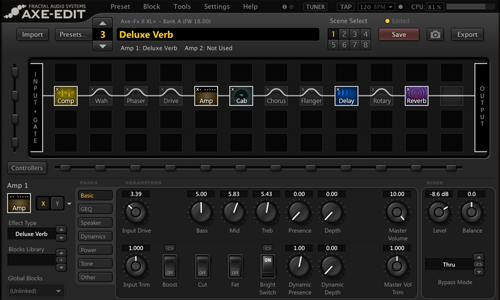
    • Installing and testing the AXE editor software
    • Review of what we covered and making sure Joe was confident operating his equipment on his own.
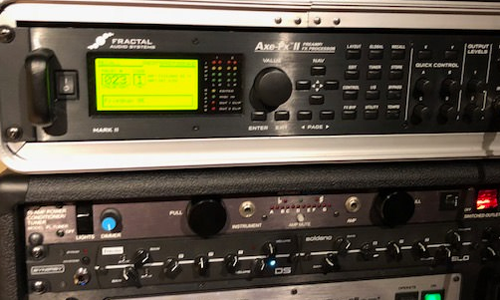
    Fractal Audio AXE FX2
    Fractal Audio AXE2 Editor

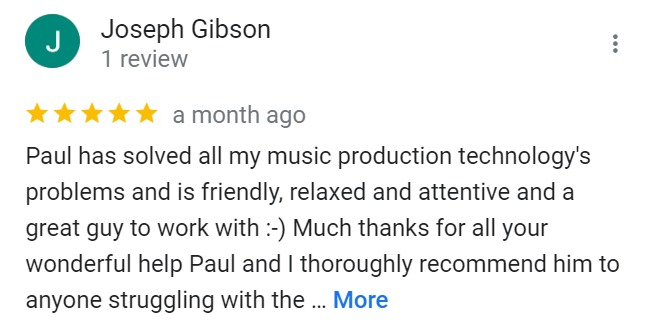
    At the end of the half-day session at Joe’s he was happy that he now had all his gear working correctly. After the session, he kindly took the time to leave me this nice review:
    Categories: ,

    No automated tickets, no waiting queues — just one-to-one help from an experienced music technology specialist. I’ll connect to your system remotely, identify the issue, and guide you through the fix.

    Recent problems solved for real clients.

    Optimising Logic Pro CPU Usage for Large Orchestral Mixes

    Client’s Question

    Why does Logic Pro keep crashing when I add plugins to my tracks?

    Session Result

    CPU load drastically reduced; mix workflow stabilised via bus routing.

    Read Full Case Study Report: Visiting a Guitarist to Help With His Logic Pro Recording Setup
    Preparing for a Studio Hardware Installation

    Client’s Question

    What cables do I need to connect my hardware synths to my mixer?

    Session Result

    Equipment audited, cable inventory confirmed, site visit planned.

    Read Full Case Study Report: Visiting a Guitarist to Help With His Logic Pro Recording Setup
    Mono Microphone Only in Left Speaker Fix in Logic Pro

    Client’s Question

    Why is my mono mic input only coming out of the left speaker in Logic Pro?

    Session Result

    Mono input successfully centred by changing Logic Pro track format from Stereo to Mono.

    Read Full Case Study Report: Visiting a Guitarist to Help With His Logic Pro Recording Setup
    Managing Native Instruments Komplete Libraries in Kontakt

    Client’s Question

    How do I hide unwanted libraries in the Kontakt side pane?

    Session Result

    Unused libraries hidden, visual clutter removed.

    Read Full Case Study Report: Visiting a Guitarist to Help With His Logic Pro Recording Setup
  • Lesson on Using Automation in Logic Pro

    Lesson on Using Automation in Logic Pro

    Hi Paul. I have some questions about some functions in Logic Pro X. Can you help me? – Laurie

    I received the above message from Laurie and we arranged to connect for a remote support lesson.

    Once we were connected via WhatsApp and AnyDesk, Laurie explained that he wanted instrument sounds to change in volume and tone throughout the duration of his song and I told him the best way to do that was with automation. We then spent our lesson time covering:

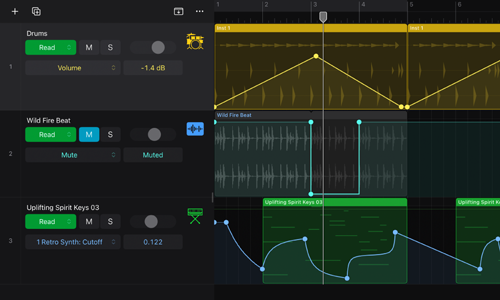
    • Overview of how automation works in Logic Pro
    • The difference between Track and Region automation
    • How to select a parameter to be automated (volume, mute, pan etc)
    • How to edit automation with cursor tools
    • How to record automation in real time
    • The Reading and Writing options when using automation
    • How to assign MIDI controller faders to automation parameters
    • How to automate parameters within Insert FX (Reverb/delay levels, cut-off, etc)
    Logic Pro Automation

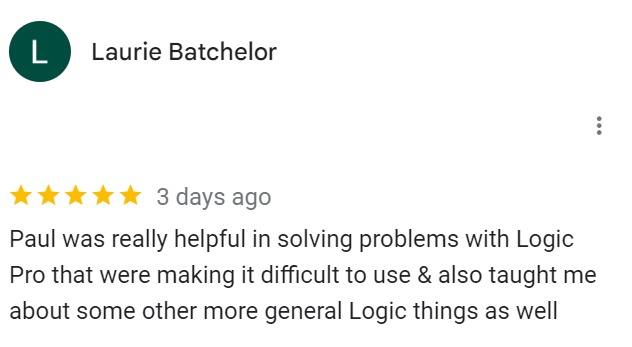
    At the end of the session, Laurie now had a strong grasp of the options for automation in Logic and was confident using them for himself. He kindly took the time to leave me this nice review:

    ‘…helpful in soving problems with Logic Pro…’
    Categories: , , ,

    No automated tickets, no waiting queues — just one-to-one help from an experienced music technology specialist. I’ll connect to your system remotely, identify the issue, and guide you through the fix.

    Recent problems solved for real clients.

    Optimising Logic Pro CPU Usage for Large Orchestral Mixes

    Client’s Question

    Why does Logic Pro keep crashing when I add plugins to my tracks?

    Session Result

    CPU load drastically reduced; mix workflow stabilised via bus routing.

    Read Full Case Study Report: Lesson on Using Automation in Logic Pro
    Preparing for a Studio Hardware Installation

    Client’s Question

    What cables do I need to connect my hardware synths to my mixer?

    Session Result

    Equipment audited, cable inventory confirmed, site visit planned.

    Read Full Case Study Report: Lesson on Using Automation in Logic Pro
    Mono Microphone Only in Left Speaker Fix in Logic Pro

    Client’s Question

    Why is my mono mic input only coming out of the left speaker in Logic Pro?

    Session Result

    Mono input successfully centred by changing Logic Pro track format from Stereo to Mono.

    Read Full Case Study Report: Lesson on Using Automation in Logic Pro
    Managing Native Instruments Komplete Libraries in Kontakt

    Client’s Question

    How do I hide unwanted libraries in the Kontakt side pane?

    Session Result

    Unused libraries hidden, visual clutter removed.

    Read Full Case Study Report: Lesson on Using Automation in Logic Pro
  • Home Studio Visit to Configure Prism Monitoring Setup
    Home Studio Visit to Configure Prism Monitoring Setup
    Hi Paul. I’m having quite a few issues with Ableton routing through my interface (Prism Sound Atlas) and with an external Bricasti reverb. Could we arrange a visit? – Matthew

    I visited Matthew in London for a half-day onsite support session. This is how we spent the time:

    Matthew talked me through his equipment, explained the problems he was experiencing and what he wanted to achieve.

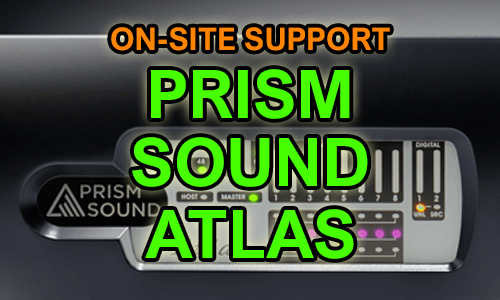
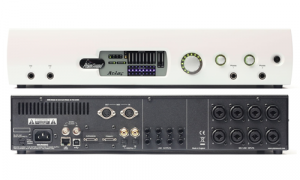
    Prism Sound Atlas Hardware
    • I checked over Matthew’s Mac and made sure everything was installed correctly
    • Ran tests to make sure all the hardware was working correctly
    • Configured Ableton and Prism’s software to achieve zero-latency monitoring while recording
    • Connected and configured Matthew’s hardware reverb so he could use it as a plug-in within Ableton
    • Tested the setup and made sure Matthew was confident operating it for himself
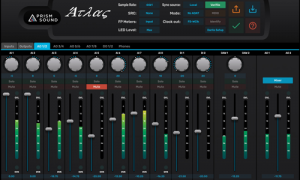
    Prism Sound Atlas Software

     At the end of the session, Matthew was happy his studio was now functioning correctly and was kind enough to leave me this nice review:

    Categories: , , ,

    No automated tickets, no waiting queues — just one-to-one help from an experienced music technology specialist. I’ll connect to your system remotely, identify the issue, and guide you through the fix.

    Recent problems solved for real clients.

    Optimising Logic Pro CPU Usage for Large Orchestral Mixes

    Client’s Question

    Why does Logic Pro keep crashing when I add plugins to my tracks?

    Session Result

    CPU load drastically reduced; mix workflow stabilised via bus routing.

    Read Full Case Study Report: Home Studio Visit to Configure Prism Monitoring Setup
    Preparing for a Studio Hardware Installation

    Client’s Question

    What cables do I need to connect my hardware synths to my mixer?

    Session Result

    Equipment audited, cable inventory confirmed, site visit planned.

    Read Full Case Study Report: Home Studio Visit to Configure Prism Monitoring Setup
    Mono Microphone Only in Left Speaker Fix in Logic Pro

    Client’s Question

    Why is my mono mic input only coming out of the left speaker in Logic Pro?

    Session Result

    Mono input successfully centred by changing Logic Pro track format from Stereo to Mono.

    Read Full Case Study Report: Home Studio Visit to Configure Prism Monitoring Setup
    Managing Native Instruments Komplete Libraries in Kontakt

    Client’s Question

    How do I hide unwanted libraries in the Kontakt side pane?

    Session Result

    Unused libraries hidden, visual clutter removed.

    Read Full Case Study Report: Home Studio Visit to Configure Prism Monitoring Setup
  • No Sound from Tascam US-4x4HR Audio Interface – Solved

    No Sound from Tascam US-4x4HR Audio Interface – Solved

    Hi Paul. I have no sound coming from my TASCAM audio interface. I can hear my microphone through the headphones but not Cubase. Also only microphone inputs 1 and 2 are working. Can you help me please? – Mike

    I received the above message from Mike and we arranged a time to connect for a remote support session.

    From the text in Mike’s message, I already had an idea of what the problem might be.

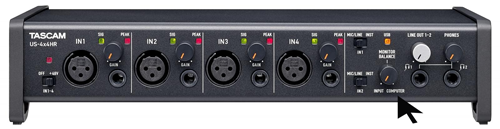
    The Tascam 4×4 has a knob on the front of the unit that is labelled MONITOR BALANCE.

    This knob can be set to INPUT and the user will hear the live sound coming from their microphone.

    The knob can be set to COMPUTER and the user will hear sound coming from their computer. (Eg Logic, Cubase, Ableton, YouTube, etc)

    Or the knob can be set somewhere in the middle to achieve a balance between the two. For example, a singer wearing headphones might want to hear their live vocals while at the same time hearing a backing track being played back by their DAW.

    Setting the MONITOR BALANCE knob around 12 o’clock allows the singer to set the levels of their live vocals and backing track in relation to each other.

    Once Mike and I were connected for our remote support session, it did indeed turn out that MONITOR BALANCE was set fully left and this was the reason for his not being able to hear any sound from his Mac. Once the knob was set to the middle, Mike could now hear his backing tracks coming from Cubase.

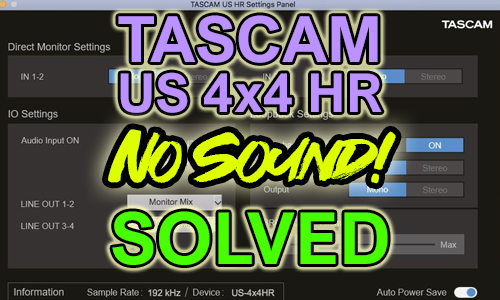
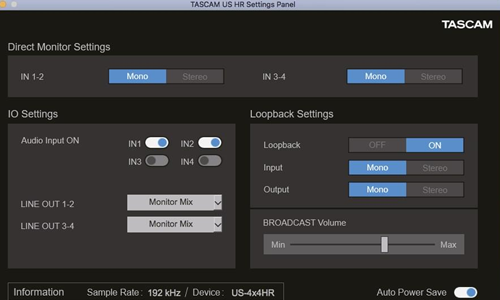
    I also showed Mike how to use the TASCAM software installed with his audio interface to enable all the inputs.

    We needed to make active IN3 and IN4 in the US HR Settings Panel, found in the Applications folder on his Mac.

    Once we had all the settings correct, Mike and I ran some tests to confirm everything was working and he could now record in Cubase.

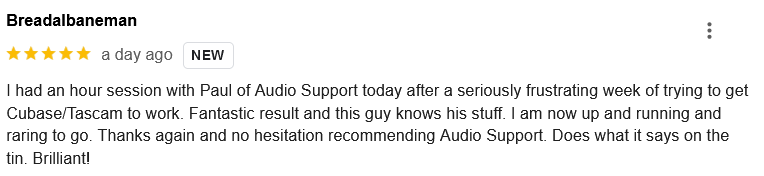
    At the end of the session, Mike was kind enough to leave me this nice review:

    “I had an hour session with Paul of Audio Support today after a seriously frustrating week of trying to get Cubase/Tascam to work. Fantastic result and this guy knows his stuff. I am now up and running and raring to go. Thanks again and no hesitation recommending Audio Support. Does what it says on the tin. Brilliant!”

    Thanks Mike! Happy to help and here if you or anyone else needs similar help in the future.

    Categories: , ,

    No automated tickets, no waiting queues — just one-to-one help from an experienced music technology specialist. I’ll connect to your system remotely, identify the issue, and guide you through the fix.

    Recent problems solved for real clients.

    Optimising Logic Pro CPU Usage for Large Orchestral Mixes

    Client’s Question

    Why does Logic Pro keep crashing when I add plugins to my tracks?

    Session Result

    CPU load drastically reduced; mix workflow stabilised via bus routing.

    Read Full Case Study Report: No Sound from Tascam US-4x4HR Audio Interface – Solved
    Preparing for a Studio Hardware Installation

    Client’s Question

    What cables do I need to connect my hardware synths to my mixer?

    Session Result

    Equipment audited, cable inventory confirmed, site visit planned.

    Read Full Case Study Report: No Sound from Tascam US-4x4HR Audio Interface – Solved
    Mono Microphone Only in Left Speaker Fix in Logic Pro

    Client’s Question

    Why is my mono mic input only coming out of the left speaker in Logic Pro?

    Session Result

    Mono input successfully centred by changing Logic Pro track format from Stereo to Mono.

    Read Full Case Study Report: No Sound from Tascam US-4x4HR Audio Interface – Solved
    Managing Native Instruments Komplete Libraries in Kontakt

    Client’s Question

    How do I hide unwanted libraries in the Kontakt side pane?

    Session Result

    Unused libraries hidden, visual clutter removed.

    Read Full Case Study Report: No Sound from Tascam US-4x4HR Audio Interface – Solved
  • Komplete Kontrol Missing Presets in Logic Pro

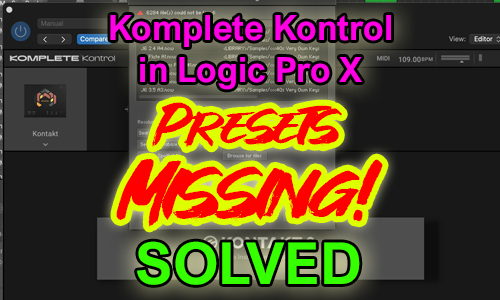
    Komplete Kontrol Missing Presets in Logic Pro

    Hi Paul. I can’t see any of my instruments in Komplete Kontrol in Logic Pro. Can we connect for you to sort that out for me? – Sam

    I received the above message from Sam and we arranged a time to connect for later that day. At the start of the session, I called Sam on WhatsApp and we connected our screens via AnyDesk.

    Sam showed me the problem where certain Kontakt instruments had no presets available for selection in Komplete Kontrol.

    I went through my usual troubleshooting steps. I checked compatibility information to make sure the right software versions were installed on Sam’s system and I searched online to see if anyone else had experienced this issue.

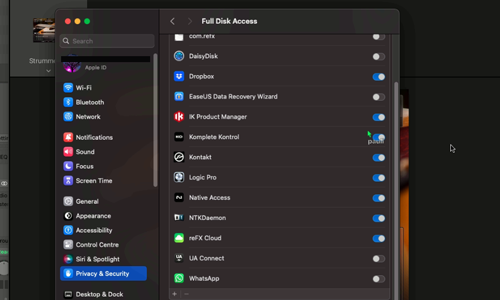
    The solution in this case turned out to be straightforward. We needed to open OSX’s security preferences and enable Full Disk Access for Komplete Kontrol to manage its presets.

    Once the security preferences were set we reopened Logic Pro and confirmed all the missing presets were now available in Komplete Kontrol.

    Categories: , , , , , , , , ,

    No automated tickets, no waiting queues — just one-to-one help from an experienced music technology specialist. I’ll connect to your system remotely, identify the issue, and guide you through the fix.

    Recent problems solved for real clients.

    Optimising Logic Pro CPU Usage for Large Orchestral Mixes

    Client’s Question

    Why does Logic Pro keep crashing when I add plugins to my tracks?

    Session Result

    CPU load drastically reduced; mix workflow stabilised via bus routing.

    Read Full Case Study Report: Komplete Kontrol Missing Presets in Logic Pro
    Preparing for a Studio Hardware Installation

    Client’s Question

    What cables do I need to connect my hardware synths to my mixer?

    Session Result

    Equipment audited, cable inventory confirmed, site visit planned.

    Read Full Case Study Report: Komplete Kontrol Missing Presets in Logic Pro
    Mono Microphone Only in Left Speaker Fix in Logic Pro

    Client’s Question

    Why is my mono mic input only coming out of the left speaker in Logic Pro?

    Session Result

    Mono input successfully centred by changing Logic Pro track format from Stereo to Mono.

    Read Full Case Study Report: Komplete Kontrol Missing Presets in Logic Pro
    Managing Native Instruments Komplete Libraries in Kontakt

    Client’s Question

    How do I hide unwanted libraries in the Kontakt side pane?

    Session Result

    Unused libraries hidden, visual clutter removed.

    Read Full Case Study Report: Komplete Kontrol Missing Presets in Logic Pro
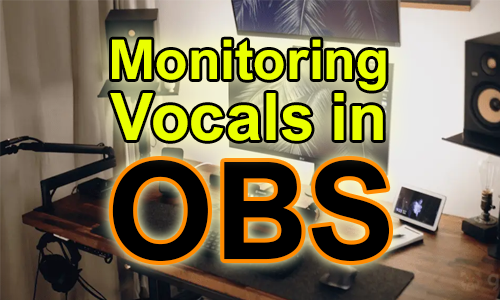
  • OBS Live Streaming Audio Fix: Routing Focusrite Mic & VST Effects with VoiceMeeter on Windows

    OBS Live Streaming Audio Fix: Routing Focusrite Mic & VST Effects with VoiceMeeter on Windows

    Hi Paul. I have a new Windows laptop and I want to stream to Youtube live. I have my microphone, Focusrite Scarlett audio interface and OBS installed but I’m having problems getting it all configured. Can you help? Amy

    I received the above message and arranged a time to connect with Amy. We spoke via WhatsApp and set up a remote desktop connection so that I could see her screen and take control of her PC.

    Amy’s brief was pretty straightforward:

    • Perform her songs in her home studio
    • Capture audio of the performance using Rode NT1A microphone connected to Focusrite Scarlett audio interface
    • Capture video using USB webcam
    • Add effects to her vocals (EQ, Compression, Reverb) using VST plugins
    • Combine audio and video and add text to the video
    • Stream to YouTube/Facebook Live

    I took control of Amy’s PC and after a bit of experimenting and configuration I found this combination of software produced the desired results:

    • Focusrite Scarlett Driver
    • VoiceMeeter Banana
    • Light Host
    • Open Broadcast Studio

    Focusrite Scarlett Driver

    https://downloads.focusrite.com/focusrite

    To connect most USB-audio interfaces to Windows, driver software needs to be installed. Focusrite drivers can be found here. Drivers allow the PC to connect to the audio interface and route the signal from the microphone into Windows.

    Once installed, I set the latency buffer to 64 and the sample rate to 44.1k

    VoiceMeeter Banana

    https://vb-audio.com/Voicemeeter/banana.htm

    VoiceMeeter is an amazing piece of free/donationware software that allows you to route audio around Windows.

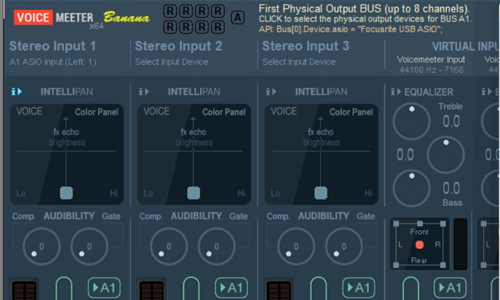
    In VoiceMeeter the settings that needed to be changed were:

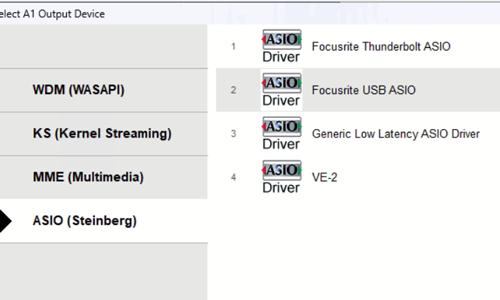
    Use ASIO as audio format

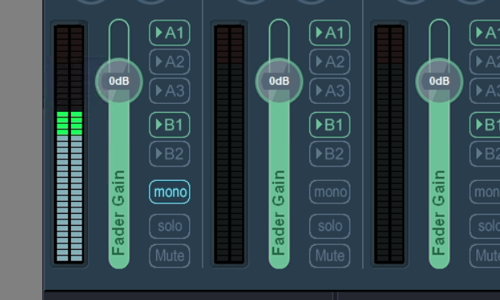
    Set Stereo Input 1 to A1 ASIO input 1 (Left input of Focusrite Scarlett)

    Activate Outputs A1, B1 on Channel 1

    Turn MONO on for Channel 1 (so vocals would be on both sides of singer’s headphones).

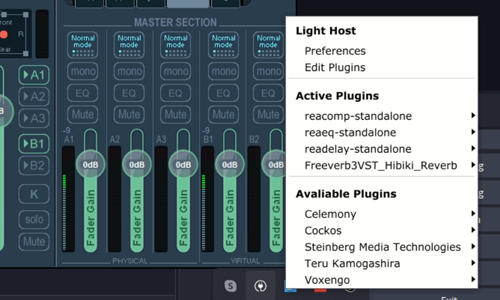
    VoiceMeeter Banana also allows inserts to be run from individual channels. I activated this to allow Light Host to add VST effects to singer’s voice.

    Light Host

    https://github.com/rolandoislas/LightHost

    Light Host is a small piece of free software that allows real-time VST effects to be run in windows without a DAW (such as Cubase or Reaper).

    Once installed, it sits in the menu bar and has a simple editor menu:

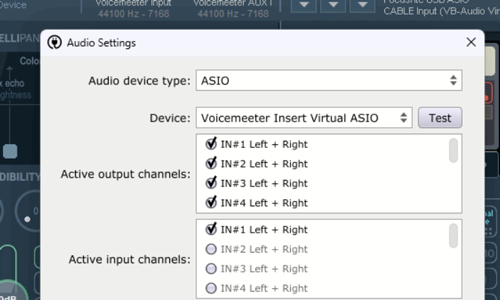
    Light Host needed to be set to use VoiceMeeter Insert Virtual ASIO in its Audio Settings window.

    Once Light Host was installed and running as an insert on channel 1 of VoiceMeeter I set up the VST effects. In Amy’s instance, she already knew which effects she wanted to use from her Reaper track template, so I recreated her custom settings inside Light Host.

    • EQ
    • Compression
    • Delay
    • Reverb

    We tested the setup and Amy could hear her vocals through her headphones in real-time and with effects.

    Open Broadcast Studio

    https://obsproject.com

    OBS is another amazing free app that is used for streaming to YouTube/Facebook/Twitch etc. There are hundreds of guides to using OBS online, so I won’t go into detail into it again here.

    Initially we had problems with audio in OBS. Digital noises would appear in the headphones as soon as the software was opened and we had problems with choppy/stuttering audio when trying to make test recordings.

    These problems were solved by:

    • Disabling all other audio devices (Realtek sound card, HMDI audio) in Windows device manager
    • Making sure all audio apps on the PC were running at the same sample rate
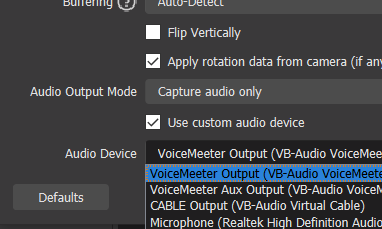
    • Using Custom Audio Device on the Webcam’s Advanced Audio Properties and setting to VoiceMeeter Out B1

    Once audio and video were working, we ran some tests and were happy to find streaming to both YouTube and Facebook Live was working well.

    I left Amy to try out her new setup on her own and made some suggestions on how she could improve the look of her streams with some of the features of OBS.

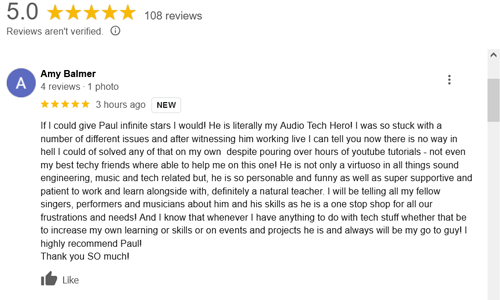
    After the job was complete, Amy was kind enough to leave me this nice review:

    If I could give Paul infinite stars I would! He is literally my Audio Tech Hero! I was so stuck with a number of different issues and after witnessing him working live I can tell you now there is no way in hell I could of solved any of that on my own despite pouring over hours of youtube tutorials – not even my best techy friends where able to help me on this one! He is not only a virtuoso in all things sound engineering, music and tech related but, he is so personable and funny as well as super supportive and patient to work and learn alongside with, definitely a natural teacher. I will be telling all my fellow singers, performers and musicians about him and his skills as he is a one stop shop for all our frustrations and needs! And I know that whenever I have anything to do with tech stuff whether that be to increase my own learning or skills or on events and projects he is and always will be my go to guy! I highly recommend Paul! Thank you SO much!

    No automated tickets, no waiting queues — just one-to-one help from an experienced music technology specialist. I’ll connect to your system remotely, identify the issue, and guide you through the fix.

    Recent problems solved for real clients.

    Optimising Logic Pro CPU Usage for Large Orchestral Mixes

    Client’s Question

    Why does Logic Pro keep crashing when I add plugins to my tracks?

    Session Result

    CPU load drastically reduced; mix workflow stabilised via bus routing.

    Read Full Case Study Report: OBS Live Streaming Audio Fix: Routing Focusrite Mic & VST Effects with VoiceMeeter on Windows
    Preparing for a Studio Hardware Installation

    Client’s Question

    What cables do I need to connect my hardware synths to my mixer?

    Session Result

    Equipment audited, cable inventory confirmed, site visit planned.

    Read Full Case Study Report: OBS Live Streaming Audio Fix: Routing Focusrite Mic & VST Effects with VoiceMeeter on Windows
    Mono Microphone Only in Left Speaker Fix in Logic Pro

    Client’s Question

    Why is my mono mic input only coming out of the left speaker in Logic Pro?

    Session Result

    Mono input successfully centred by changing Logic Pro track format from Stereo to Mono.

    Read Full Case Study Report: OBS Live Streaming Audio Fix: Routing Focusrite Mic & VST Effects with VoiceMeeter on Windows
    Managing Native Instruments Komplete Libraries in Kontakt

    Client’s Question

    How do I hide unwanted libraries in the Kontakt side pane?

    Session Result

    Unused libraries hidden, visual clutter removed.

    Read Full Case Study Report: OBS Live Streaming Audio Fix: Routing Focusrite Mic & VST Effects with VoiceMeeter on Windows
  • Problems Upgrading to Steinberg Activation Manager – Solved

    Problems Upgrading to Steinberg Activation Manager – Solved

    Last week, I helped a client who had moved his Cubase system from a PC to a new Mac. He needed my help restoring all his Steinberg VST plug-ins.

    The process was complicated by the current situation involving Steinberg moving from their soft and USB e-licensers to a cloud-based system called Steinberg Licensing.

    We started by accessing my client’s MySteinberg account. This involved a ‘Forgot Password’ process, but I guided my client through the process and we reset his password.

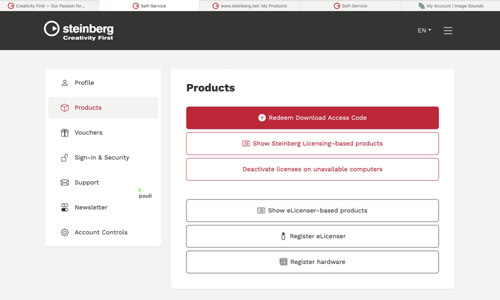
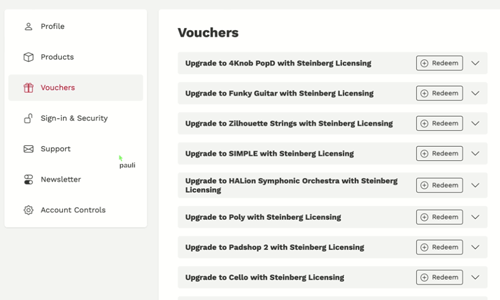
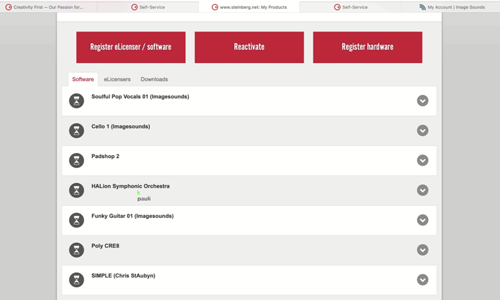
    Once inside the Products page on my client’s MySteinberg account, we could access Voucher codes which could be used with Steinberg’s Activation Manager software to upgrade his licence to the new format.

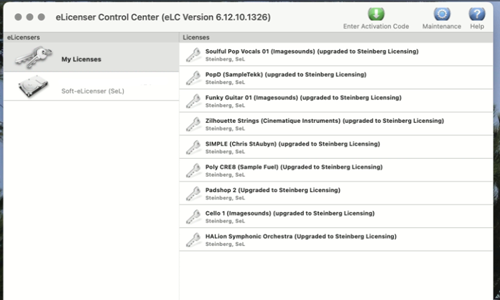
    For this particular client, we found he needed to go through an extra step and reactivate all his licences to a new soft eLicenser on his new Mac first before he could use the voucher codes. This soft eLicenser had to be registered on the MySteinberg page and the licences re-activated.

    This proved to be quite a slow process as each licence needed to reactivated individually and then each code copy-and-pasted between three apps. (Steinberg Activation Manager, eLicenser Control Centre and Steinberg Download Assistant.)

    We encountered more problems when Download Assistant failed to update itself and some activations failed for no clear reason and then worked on the second or third attempt. (Possibly server problems on Steinberg’s end.)

    Eventually we were able to troubleshoot all the problems and my client was able to open his existing Cubase projects on his new Mac without VST-missing error messages.

    If you are experiencing similar problems with Steinberg Licensing and would like to book expert help via a remote support session, please get in touch.

    Categories: , ,

    No automated tickets, no waiting queues — just one-to-one help from an experienced music technology specialist. I’ll connect to your system remotely, identify the issue, and guide you through the fix.

    Recent problems solved for real clients.

    Optimising Logic Pro CPU Usage for Large Orchestral Mixes

    Client’s Question

    Why does Logic Pro keep crashing when I add plugins to my tracks?

    Session Result

    CPU load drastically reduced; mix workflow stabilised via bus routing.

    Read Full Case Study Report: Problems Upgrading to Steinberg Activation Manager – Solved
    Preparing for a Studio Hardware Installation

    Client’s Question

    What cables do I need to connect my hardware synths to my mixer?

    Session Result

    Equipment audited, cable inventory confirmed, site visit planned.

    Read Full Case Study Report: Problems Upgrading to Steinberg Activation Manager – Solved
    Mono Microphone Only in Left Speaker Fix in Logic Pro

    Client’s Question

    Why is my mono mic input only coming out of the left speaker in Logic Pro?

    Session Result

    Mono input successfully centred by changing Logic Pro track format from Stereo to Mono.

    Read Full Case Study Report: Problems Upgrading to Steinberg Activation Manager – Solved
    Managing Native Instruments Komplete Libraries in Kontakt

    Client’s Question

    How do I hide unwanted libraries in the Kontakt side pane?

    Session Result

    Unused libraries hidden, visual clutter removed.

    Read Full Case Study Report: Problems Upgrading to Steinberg Activation Manager – Solved
  • Cubase Slow Loading & Freezing Solved: Waves V13 License Conflict with Cubase 13

    Cubase Slow Loading & Freezing Solved: Waves V13 License Conflict with Cubase 13

    This week I was booked to resolve issues for two separate clients using different DAWs but with similar problems. One client was using Cubase and the other Pro Tools. In both cases, the problem turned out to be Waves plug-ins.

    The Problem

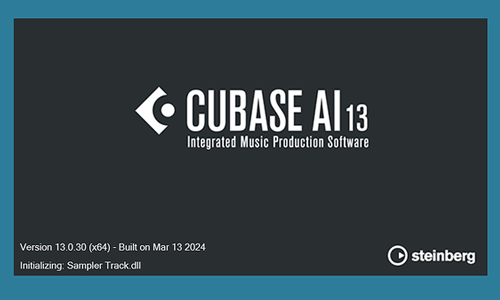
    When my client opened Cubase 13 the loading splash screen would freeze and take up to 10 minutes to resolve before loading the application.

    Once Cubase had loaded, my client tried to open a project but found certain plug-ins were missing.

    The Solution

    I went through various tests to identify the cause of the slow loading issue and found that when I removed some (but not all!) Waves plug-ins from my client’s VST plug-ins folder Cubase would load at its normal speed.

    Cubase uses a format of plug-ins called VST. Most plug-in developers release their plug-ins in this format and Cubase is able to interact with them as it programmed to do so. When there is an issue with a plug-in (for example a missing licence or missing file errors) an VST plug-in is able to launch an error message in Cubase and allow the user to solve the problem. (Activate the licence, locate the missing files etc)

    Waves plug-ins use a different system involving container files in VST format called Waveshells that host bundle files containing the plug-ins. This system usually works fine, but it seems recent changes by either Steinberg or Waves have caused a situation that where Waves licence errors are causing them to be blocked by Cubase.

    I experimented with using different versions of the Waveshells and trying to repair the Waves licences using Wave’s troubleshooting guides and the repair options in the Waves Central software. In recent years, Waves have started using a complicated system of licences/update plans to force their customers to buy updates to keep their products compatible with the latest DAWs. Users start to notice problems when they try to load old plug-ins within new DAW software or new plug-ins within older DAW software.

    In this particular instance, there seemed to be an issue specific to the Waves V13 licence’s compatibility with Cubase 13. Interestingly, V11 and V14 plug-ins were working fine on my client’s system.

    The easiest solution to the problem was to pay Waves $22 per plug-in to update the licences. Another option would have been to see if we could have used an older version of Cubase to run the plug-ins without updates, or to try using a different version of the Waveshells. Since the V11 licences were working, we could have explored that option.

    My client wanted to resolve the problem quickly, so I showed him how to purchase the updates and active them in Waves Central. Once we had updated the Waveshells to V15, the plug-ins were restored in Cubase 13.


    If you have a similar problem with your Cubase system or Waves plug-ins and would like to book a remote support session with an Audio Support expert, please get in touch.

    Find out more: How our service works.

    Categories: , , , , ,

    No automated tickets, no waiting queues — just one-to-one help from an experienced music technology specialist. I’ll connect to your system remotely, identify the issue, and guide you through the fix.

    Recent problems solved for real clients.

    Optimising Logic Pro CPU Usage for Large Orchestral Mixes

    Client’s Question

    Why does Logic Pro keep crashing when I add plugins to my tracks?

    Session Result

    CPU load drastically reduced; mix workflow stabilised via bus routing.

    Read Full Case Study Report: Cubase Slow Loading & Freezing Solved: Waves V13 License Conflict with Cubase 13
    Preparing for a Studio Hardware Installation

    Client’s Question

    What cables do I need to connect my hardware synths to my mixer?

    Session Result

    Equipment audited, cable inventory confirmed, site visit planned.

    Read Full Case Study Report: Cubase Slow Loading & Freezing Solved: Waves V13 License Conflict with Cubase 13
    Mono Microphone Only in Left Speaker Fix in Logic Pro

    Client’s Question

    Why is my mono mic input only coming out of the left speaker in Logic Pro?

    Session Result

    Mono input successfully centred by changing Logic Pro track format from Stereo to Mono.

    Read Full Case Study Report: Cubase Slow Loading & Freezing Solved: Waves V13 License Conflict with Cubase 13
    Managing Native Instruments Komplete Libraries in Kontakt

    Client’s Question

    How do I hide unwanted libraries in the Kontakt side pane?

    Session Result

    Unused libraries hidden, visual clutter removed.

    Read Full Case Study Report: Cubase Slow Loading & Freezing Solved: Waves V13 License Conflict with Cubase 13

  • Pro Tools freezing when loading a project on Windows – Solved

    Pro Tools freezing when loading a project on Windows – Solved

    This week I was booked for two different remote support requests involving different DAWs. One client was running Pro Tools and the other Cubase. Both problems had the same underlying cause.

    The Problem

    As Pro Tools loads a session template, the loading bar moves across the screen as usual and shows the status of the tracks being loaded into the project. Suddenly, the application freezes and will not progress further. Pro Tools requires a force-quit via Task Manager.

    This is almost exactly the same problem I encountered with another client using Cubase.

    To diagnose this problem, I took control of my client’s PC using AnyDesk and ran some tests. I estimated the likely cause would be a plug-in issue and after a few tests I found that by removing certain plug-ins from Pro Tool’s plug-ins folders I could get the template to load without freezing.

    The Solution

    The issue in both cases was caused by plug-ins from the company Waves.

    Pro Tools uses a format of plug-ins called AAX. Most plug-in developers release their plug-ins in this format and Pro Tools is able to interact with them as it expects to do so. When there is an issue with a plug-in (for example a missing licence or missing file errors) an AAX plug-in is able to launch an error message in Pro Tools and allow the user to solve the problem. (Activate the licence, locate the missing files etc)

    Waves plug-ins use a different system involving container files in AAX format called Waveshells that host bundle files containing the plug-ins. This system usually works fine, but it seems recent changes by either Avid or Waves have caused a situation that where Waves licence errors are crashing Pro Tools.

    For this job, the client was happy that his template now loaded and he told me he no longer wanted to use those Waves plug-ins. We removed the Waves plug-ins from the template and replaced them with plug-ins from other developers.

    Another option would be to update his Waves plug-ins, but that would have required paying Waves for updated licences.

    We could also have run further tests to try to find a version of the Waveshells and Pro Tools that were compatible with each other. This could have resolved the problem without the need to pay for Waves updates.


    If you have a similar problem with your Pro Tools system or Waves plug-ins and would like to book a remote support session with an Audio Support expert, please get in touch.

    Find out more: How our service works.

    Categories: , , , , ,

    No automated tickets, no waiting queues — just one-to-one help from an experienced music technology specialist. I’ll connect to your system remotely, identify the issue, and guide you through the fix.

    Recent problems solved for real clients.

    Optimising Logic Pro CPU Usage for Large Orchestral Mixes

    Client’s Question

    Why does Logic Pro keep crashing when I add plugins to my tracks?

    Session Result

    CPU load drastically reduced; mix workflow stabilised via bus routing.

    Read Full Case Study Report: Pro Tools freezing when loading a project on Windows – Solved
    Preparing for a Studio Hardware Installation

    Client’s Question

    What cables do I need to connect my hardware synths to my mixer?

    Session Result

    Equipment audited, cable inventory confirmed, site visit planned.

    Read Full Case Study Report: Pro Tools freezing when loading a project on Windows – Solved
    Mono Microphone Only in Left Speaker Fix in Logic Pro

    Client’s Question

    Why is my mono mic input only coming out of the left speaker in Logic Pro?

    Session Result

    Mono input successfully centred by changing Logic Pro track format from Stereo to Mono.

    Read Full Case Study Report: Pro Tools freezing when loading a project on Windows – Solved
    Managing Native Instruments Komplete Libraries in Kontakt

    Client’s Question

    How do I hide unwanted libraries in the Kontakt side pane?

    Session Result

    Unused libraries hidden, visual clutter removed.

    Read Full Case Study Report: Pro Tools freezing when loading a project on Windows – Solved
  • Arturia Keylab Essential 61 MIDI control surface options in Logic Pro

    Arturia Keylab Essential 61 MIDI control surface options in Logic Pro

    Hi Paul. I recently bought the Arturia Keylab Essential MK3 MIDI keyboard. Upon setting up I noticed a few confusing errors. When opening Logic Pro’s Control Surface Setup (as instructed by the Arturia setup article) to select “KL Essential 61 MK3 DAW” I am not given that option. I only see

    • KL Essential 61 mk3 MIDI
    • KL Essential 61 mk3 DIN/THRU
    • KL Essential 61 mk3 MCU/HUI
    • KL Essential 61 mk3 ALV

    Can you help me work out what is going on please? – Iz

    Paul from Audio Support explains the problem:

    Hi Iz. The issue here is that the text shown in Logic Pro doesn’t match the text from the setup article provided by Arturia. Here’s what each of those options means:

    KL Essential 61 mk3 MIDI

    This option selects the MIDI port that Logic uses to recognise notes played on the keys, pads and controller wheels of the MIDI keyboard. Logic should recognise this port as soon as you connect your keyboard via USB and automatically assign it to play the selected instrument track.

    This is the port used for the basic functionality of the keyboard. It is not the one to use when connecting the Keylab as a control surface in Logic.

    KL Essential 61 mk3 DIN/THRU

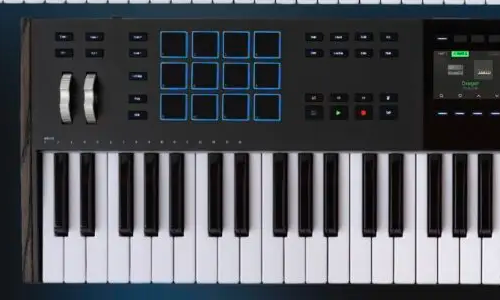
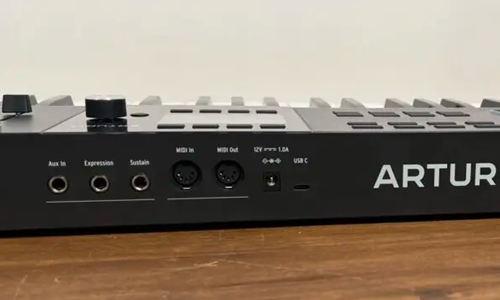
    The rear of an Arturia Keylab Essential mk3

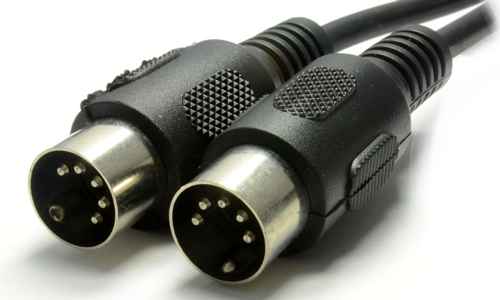
    Looking at the back of the keyboard, you will see sockets with MIDI In and MIDI Out printed above them. These sockets allow you to use a 5-pin DIN cable to connect your keyboard to other MIDI devices.

    5-Pin DIN MIDI Cable

    If you have another MIDI device (maybe another keyboard or a fader bank) that you want to use to play instruments and control sounds in Logic Pro, then MIDI-IN is the port that Logic Pro will use to receive those messages.

    If you want to send MIDI notes and controller messages (perhaps to an older hardware synth) then you can connect your 5 Pin DIN cable from the MIDI Out of the Keylab to the MIDI in of your synth.

    If you don’t have any external devices connected to Logic Pro, then you can ignore this option. This is not the option to use when setting up the Keylab as a control surface in Logic.

    KL Essential 61 mk3 ALV

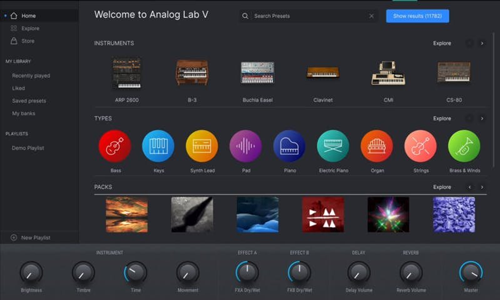
    When you buy the Keylab Essential 61 mk3, the product comes bundled with Arturia software, including Analog Lab V.

    Arturia’s Analog Lab V software

    If you want to run Analog Lab V as a standalone app and send or receive MIDI to/from other music apps on your Mac, then this MIDI port allows that to work.

    In Iz’s case, she wouldn’t need to use Analog Lab as a standalone app, since it works fine as a plug-in within Logic Pro. This is not the option to use to set up the Keylab as a control surface in Logic.

    KL Essential 61 mk3 MCU/HUI

    This is the port to select to use the Keylab as a control surface in Logic. “MCU” stands for Mackie Control Universal and is a generic protocol for control surfaces to control DAWs such as Logic, Cubase, Ableton etc. “HUI” stands for Human User Interface and is another generic protocol standard.

    This is the port to select to use the Keylab as a control surface in Logic.

    Hope that helps Iz. Good luck! – Paul

    Categories: , , , , , ,

    No automated tickets, no waiting queues — just one-to-one help from an experienced music technology specialist. I’ll connect to your system remotely, identify the issue, and guide you through the fix.

    Recent problems solved for real clients.

    Optimising Logic Pro CPU Usage for Large Orchestral Mixes

    Client’s Question

    Why does Logic Pro keep crashing when I add plugins to my tracks?

    Session Result

    CPU load drastically reduced; mix workflow stabilised via bus routing.

    Read Full Case Study Report: Arturia Keylab Essential 61 MIDI control surface options in Logic Pro
    Preparing for a Studio Hardware Installation

    Client’s Question

    What cables do I need to connect my hardware synths to my mixer?

    Session Result

    Equipment audited, cable inventory confirmed, site visit planned.

    Read Full Case Study Report: Arturia Keylab Essential 61 MIDI control surface options in Logic Pro
    Mono Microphone Only in Left Speaker Fix in Logic Pro

    Client’s Question

    Why is my mono mic input only coming out of the left speaker in Logic Pro?

    Session Result

    Mono input successfully centred by changing Logic Pro track format from Stereo to Mono.

    Read Full Case Study Report: Arturia Keylab Essential 61 MIDI control surface options in Logic Pro
    Managing Native Instruments Komplete Libraries in Kontakt

    Client’s Question

    How do I hide unwanted libraries in the Kontakt side pane?

    Session Result

    Unused libraries hidden, visual clutter removed.

    Read Full Case Study Report: Arturia Keylab Essential 61 MIDI control surface options in Logic Pro