Category: DAW

  • Cubase 12 Freezing on Launch – Solved

    Cubase 12 Freezing on Launch – Solved

    Hi Paul. Cubase 12 freezes when I try and launch it with my Novation Launch Key Mini connected by USB. Can you help me?

    Stuart

    I received the above email from a new client and we arranged a time to connect the next day.

    Once we were speaking on the phone and had set up an AnyDesk connection between our screens, Stuart showed me the problem occurring: Once Cubase had launched, the program froze and was unresponsive to any cursor clicks. I couldn’t get it to quit via Task Manager, so we had to restart Stuart’s PC.

    I tried a few of my standard troubleshooting steps, like resetting Cubase’s preferences, but these didn’t work.

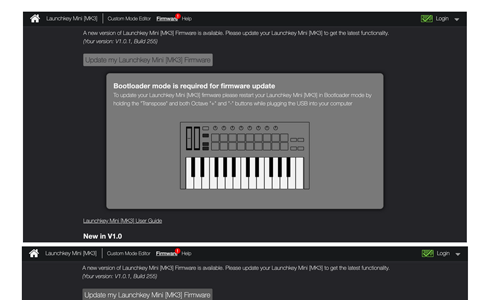
    I did a bit of research online and found that the LaunchKey Mini MK3 was definitely the problem. Novation had already recognised the issue and released a firmware update to solve the problem.

    https://support.novationmusic.com/hc/en-gb/articles/360012823320-Updating-Launchkey-Mini-MK3-Firmware

    I followed the steps in the link above and the next time we launched Cubase everything was working as it should. Stuart and I spent the rest of the hour’s session making sure his projects opened correctly and I showed him how he could use his new LaunchKey controller to play drums in Cubase using Groove Agent.

    At the end of the hour’s session, Stuart was happy that he now had Cubase working again and was kind enough to leave me this nice review. Thanks very much, Stuart!

    Categories: , , ,

    No automated tickets, no waiting queues — just one-to-one help from an experienced music technology specialist. I’ll connect to your system remotely, identify the issue, and guide you through the fix.

    Recent problems solved for real clients.

    Optimising Logic Pro CPU Usage for Large Orchestral Mixes

    Client’s Question

    Why does Logic Pro keep crashing when I add plugins to my tracks?

    Session Result

    CPU load drastically reduced; mix workflow stabilised via bus routing.

    Read Full Case Study Report: Cubase 12 Freezing on Launch – Solved
    Preparing for a Studio Hardware Installation

    Client’s Question

    What cables do I need to connect my hardware synths to my mixer?

    Session Result

    Equipment audited, cable inventory confirmed, site visit planned.

    Read Full Case Study Report: Cubase 12 Freezing on Launch – Solved
    Mono Microphone Only in Left Speaker Fix in Logic Pro

    Client’s Question

    Why is my mono mic input only coming out of the left speaker in Logic Pro?

    Session Result

    Mono input successfully centred by changing Logic Pro track format from Stereo to Mono.

    Read Full Case Study Report: Cubase 12 Freezing on Launch – Solved
    Managing Native Instruments Komplete Libraries in Kontakt

    Client’s Question

    How do I hide unwanted libraries in the Kontakt side pane?

    Session Result

    Unused libraries hidden, visual clutter removed.

    Read Full Case Study Report: Cubase 12 Freezing on Launch – Solved
  • Audio Recording Delayed in Logic Pro – Solved

    Audio Recording Delayed in Logic Pro – Solved

    In a one-hour remote support session, Paul identifies why his clients’ audio recording was out of sync with other tracks in Logic and works out how to solve the problem.

    I was recently contacted by a client who was having a problem with audio recording in Logic Pro. When he recorded into an audio track, the recorded audio would be a 1/16 note out of place with the other tracks and he couldn’t figure out why. We arranged a time to connect via WhatsApp Voice Chat and AnyDesk.

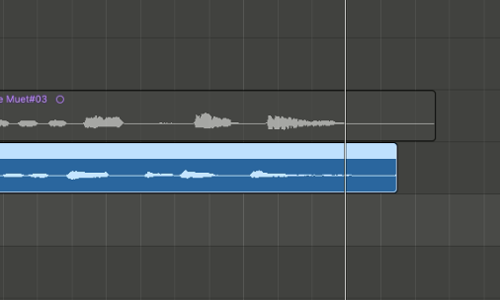
    Once I was looking at my client’s screen, we set up a new audio track and he made a new test recording. When we zoomed into the tracks, it was very clear that there was a problem. The new audio region was clearly ahead of the previous recording.

    We had a chat about my client’s setup and I estimated that the most likely reason for this, was a delay compensation issue caused by one of the plug-ins open in the project.

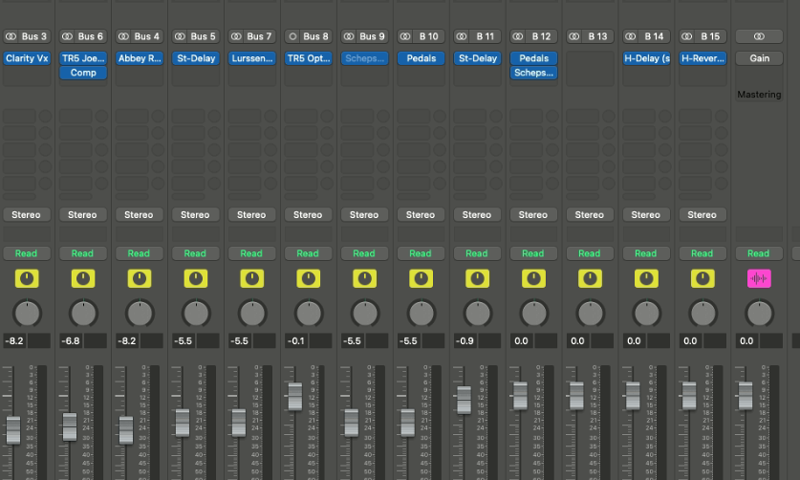
    I had a scan through of Logic’s mixer and found some likely culprits in the Aux section.

    I removed all the non-native plug-ins and my client and I ran a few recording tests. With the plug-ins removed, the audio recorded perfectly in time. We had found the problem. Now we needed to work out a solution.

    Next, we added the plug-ins back into the project individually to find what difference each one made.

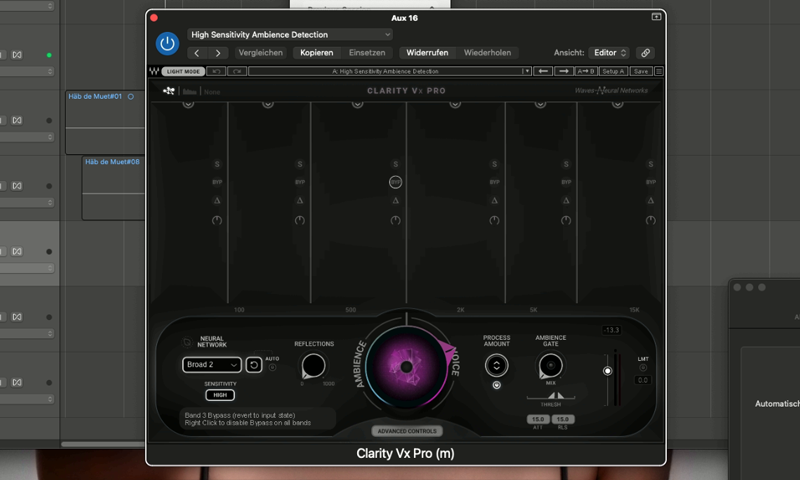
    We found the delay issue was entirely caused by the Waves Clarity Vx Pro. As long as that plug-in was open in the project, the audio would be delayed when recording.

    We ran a few more tests to see if we could stop the issue. We tried different options in Logic’s Delay Compensation settings and adjusted the parameters on the Clarity. We checked Wave’s website for help on the issue and looked through forums to see if anyone else had the same problem.

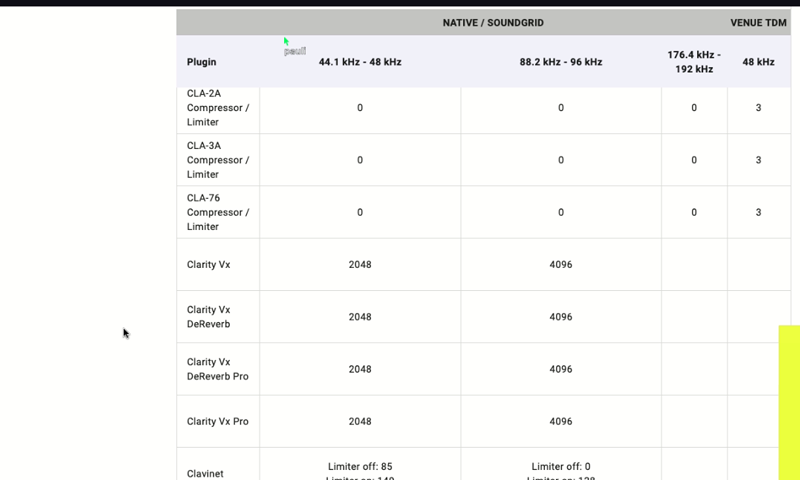
    We found a table on the Waves site that showed the delay added by various plug-ins.

    We ran another test and confirmed that 2048 was exactly the amount of delay.

    I showed my client that we could manually compensate for this using Logic’s Recording Delay slider. However, this wasn’t a good idea as the recording delay feature would be active across all his projects and this was an issue caused by a single plug-in in a single project.

    The best way for my client to work around this, would be to remove the Clarity from his project whilst he recorded new tracks. As a noise-remover, the Clarity wasn’t needed while recording, so my client was happy to only use the plug-in during the mixing stage.

    My client was pleased that he now knew the reason for the audio delay problem and how to manage it.

    Categories: , , , ,

    No automated tickets, no waiting queues — just one-to-one help from an experienced music technology specialist. I’ll connect to your system remotely, identify the issue, and guide you through the fix.

    Recent problems solved for real clients.

    Optimising Logic Pro CPU Usage for Large Orchestral Mixes

    Client’s Question

    Why does Logic Pro keep crashing when I add plugins to my tracks?

    Session Result

    CPU load drastically reduced; mix workflow stabilised via bus routing.

    Read Full Case Study Report: Audio Recording Delayed in Logic Pro – Solved
    Preparing for a Studio Hardware Installation

    Client’s Question

    What cables do I need to connect my hardware synths to my mixer?

    Session Result

    Equipment audited, cable inventory confirmed, site visit planned.

    Read Full Case Study Report: Audio Recording Delayed in Logic Pro – Solved
    Mono Microphone Only in Left Speaker Fix in Logic Pro

    Client’s Question

    Why is my mono mic input only coming out of the left speaker in Logic Pro?

    Session Result

    Mono input successfully centred by changing Logic Pro track format from Stereo to Mono.

    Read Full Case Study Report: Audio Recording Delayed in Logic Pro – Solved
    Managing Native Instruments Komplete Libraries in Kontakt

    Client’s Question

    How do I hide unwanted libraries in the Kontakt side pane?

    Session Result

    Unused libraries hidden, visual clutter removed.

    Read Full Case Study Report: Audio Recording Delayed in Logic Pro – Solved
  • Three Methods to Improve Logic Pro’s Performance on an Older iMac

    Three Methods to Improve Logic Pro’s Performance on an Older iMac

    In a recent (March 2024) technical support session a client asked me if there was anything we could do to improve the performance of Logic Pro 10.4.4 on his iMac Retina 2015 running Big Sur.

    An Apple specialist had told him he needed a new M1-Mac, but he couldn’t afford to spend thousands on this upgrade.

    I told my client we should be able to extend the life of his current Mac if we tried some techniques to improve its efficiency.

    These were my suggestions:

    1. Don’t leave a highlighted instrument track on ‘R’
    2. Adjust the I/O Buffer Size in Logic’s Audio Preferences.
    3. Use Logic’s Freeze Tracks Function

    Don’t leave a highlighted instrument track on ‘R’

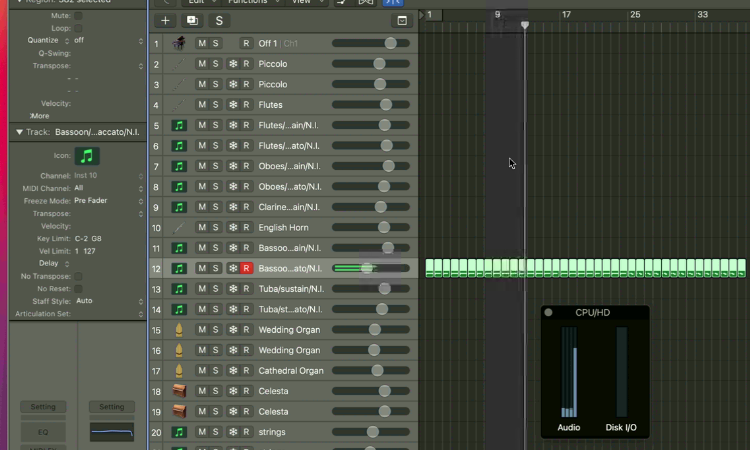
    CPU spikes can occur because of the way older Macs handle live virtual instruments and multi-core processing.

    In the pic above we are seeing a CPU spike on Core 4 while Logic is playing back MIDI through a Kontakt instrument.

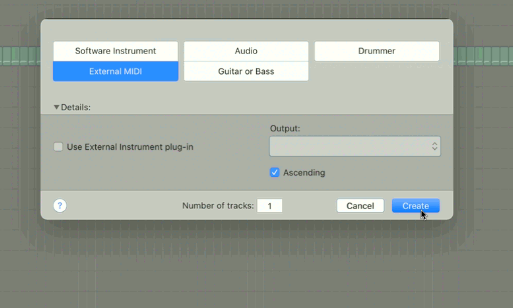
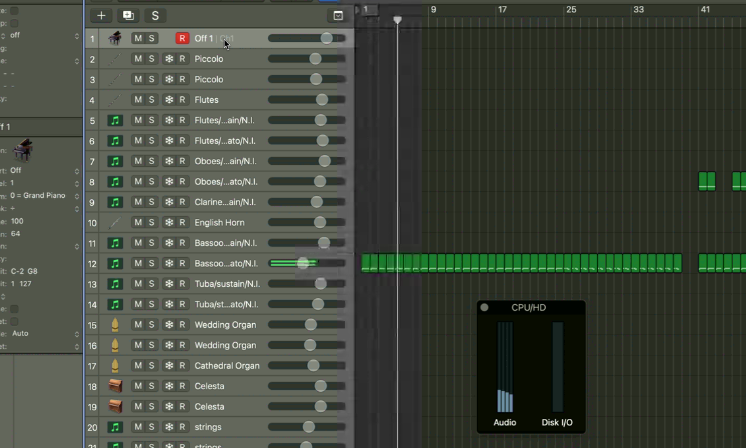
    I showed my client that if we create an External MIDI Track with No Output set as the MIDI destination and make sure this is the selected track during playback then the CPU cores will be balanced.

    This technique works because of the way Logic processes live MIDI differently to recorded MIDI.

    Adjust the I/O Buffer Size in Logic’s Audio Preferences.

    Making sure you have the DAW latency set correctly is very important in Music Technology and its worth reminding ourselves why.

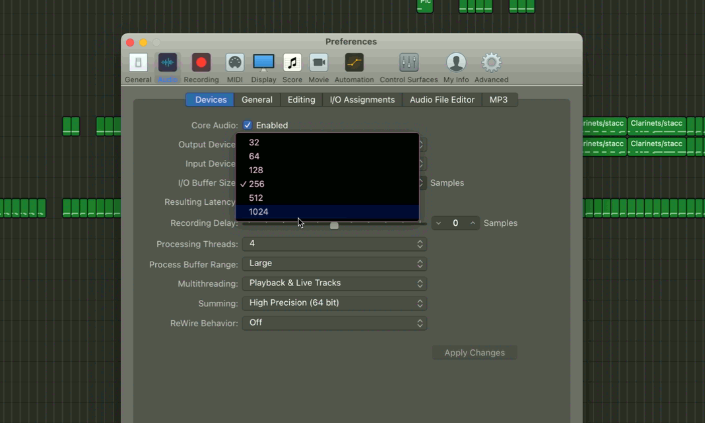
    The basic concept is that the I/O Buffer Size is the amount of time you’re giving the computer to process the sound. A longer latency setting equals more processing time.

    High latency – best when mixing a track and using effects

    Low latency – best for recording a live MIDI track

    My client was at the mixing stage with his latest track and using lots of effects. I suggested using the highest latency setting of 1024.

    Use Logic’s Freeze Tracks Function

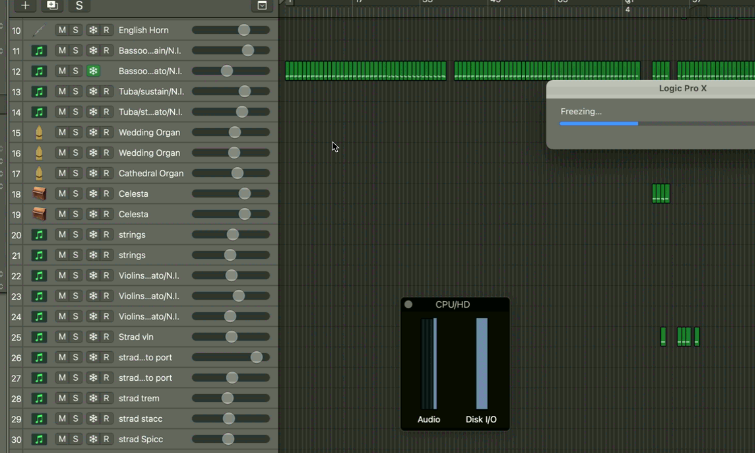
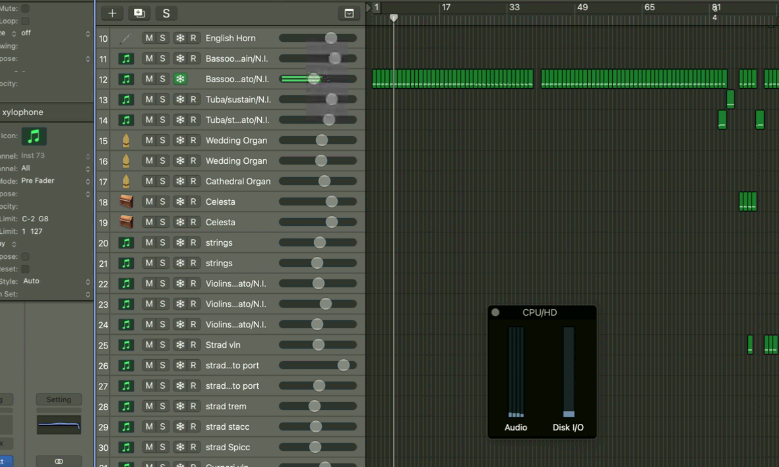
    Logic Pro has a function to turn instrument tracks into audio files called freeze. Instrument tracks use CPU resources and Audio tracks use Disk I/O. By freezing some of our instrument tracks we can reduce the amount of CPU resources we’re using in our projects and stop System Overload errors.

    When we turn on Freeze for a track Logic will perform a Freezing render before the next playback.

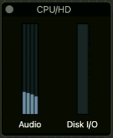
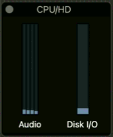
    On the next playback Logic’s performance meter shows us a slight rise in the Disk I/O use and a significant reduction in CPU Audio use.

    Pre-freezing
    Post-freezing

    Conclusion

    When I spoke to my client he was worried that his old Mac was dying and he would need to spend thousands on replacing it.

    At the end of our one-hour tech support session, my client was very happy that he now had simple techniques that he could use to extend the working life of his Mac for a few more years at least.

    Categories: , ,

    No automated tickets, no waiting queues — just one-to-one help from an experienced music technology specialist. I’ll connect to your system remotely, identify the issue, and guide you through the fix.

    Recent problems solved for real clients.

    Optimising Logic Pro CPU Usage for Large Orchestral Mixes

    Client’s Question

    Why does Logic Pro keep crashing when I add plugins to my tracks?

    Session Result

    CPU load drastically reduced; mix workflow stabilised via bus routing.

    Read Full Case Study Report: Three Methods to Improve Logic Pro’s Performance on an Older iMac
    Preparing for a Studio Hardware Installation

    Client’s Question

    What cables do I need to connect my hardware synths to my mixer?

    Session Result

    Equipment audited, cable inventory confirmed, site visit planned.

    Read Full Case Study Report: Three Methods to Improve Logic Pro’s Performance on an Older iMac
    Mono Microphone Only in Left Speaker Fix in Logic Pro

    Client’s Question

    Why is my mono mic input only coming out of the left speaker in Logic Pro?

    Session Result

    Mono input successfully centred by changing Logic Pro track format from Stereo to Mono.

    Read Full Case Study Report: Three Methods to Improve Logic Pro’s Performance on an Older iMac
    Managing Native Instruments Komplete Libraries in Kontakt

    Client’s Question

    How do I hide unwanted libraries in the Kontakt side pane?

    Session Result

    Unused libraries hidden, visual clutter removed.

    Read Full Case Study Report: Three Methods to Improve Logic Pro’s Performance on an Older iMac
  • Guitars recorded in Cubase only play back on one speaker – Solved

    Guitars recorded in Cubase only play back on one speaker – Solved

    During a recent remote support session, I helped a client answer a question about a problem recording his guitar in Cubase.

    Why does my guitar only play back on my right-hand speaker when I record it in Cubase?

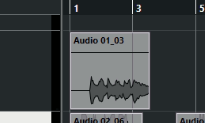
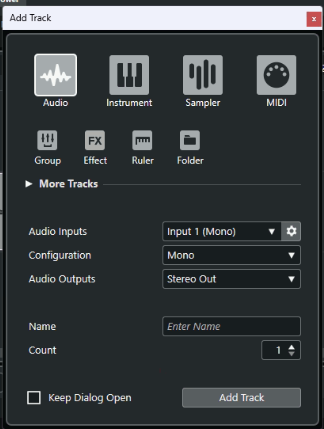
    If you make a recording in Cubase and the audio region looks like the pic above, then you have recorded a mono instrument (such as a guitar) in a stereo audio track. To fix this problem, you need to change the Configuration setting to Mono when creating an audio track:

    Categories: , ,

    No automated tickets, no waiting queues — just one-to-one help from an experienced music technology specialist. I’ll connect to your system remotely, identify the issue, and guide you through the fix.

    Recent problems solved for real clients.

    Optimising Logic Pro CPU Usage for Large Orchestral Mixes

    Client’s Question

    Why does Logic Pro keep crashing when I add plugins to my tracks?

    Session Result

    CPU load drastically reduced; mix workflow stabilised via bus routing.

    Read Full Case Study Report: Guitars recorded in Cubase only play back on one speaker – Solved
    Preparing for a Studio Hardware Installation

    Client’s Question

    What cables do I need to connect my hardware synths to my mixer?

    Session Result

    Equipment audited, cable inventory confirmed, site visit planned.

    Read Full Case Study Report: Guitars recorded in Cubase only play back on one speaker – Solved
    Mono Microphone Only in Left Speaker Fix in Logic Pro

    Client’s Question

    Why is my mono mic input only coming out of the left speaker in Logic Pro?

    Session Result

    Mono input successfully centred by changing Logic Pro track format from Stereo to Mono.

    Read Full Case Study Report: Guitars recorded in Cubase only play back on one speaker – Solved
    Managing Native Instruments Komplete Libraries in Kontakt

    Client’s Question

    How do I hide unwanted libraries in the Kontakt side pane?

    Session Result

    Unused libraries hidden, visual clutter removed.

    Read Full Case Study Report: Guitars recorded in Cubase only play back on one speaker – Solved
  • Yamaha MODX7+ Setup with Cubase AI: Fixing Driver and MIDI Doubling Issues

    Yamaha MODX7+ Setup with Cubase AI: Fixing Driver and MIDI Doubling Issues

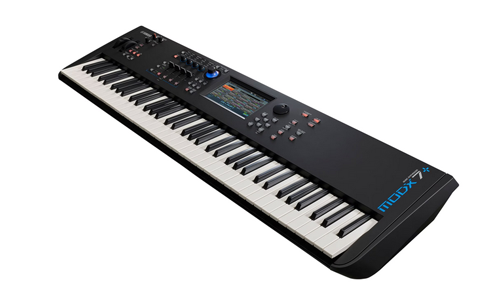
    Hi Paul. I am having problems using my Yamaha Mod X 7 Plus synthesier which came bundled with Cubase AI software. Can we connect for you to help me with this please? – Mark

    I received the above message from Mark via WhatsApp and we arranged a time to connect later that week. Here’s a breakdown of how I helped Mark:

    • Connected our screens via Anydesk.
    • Checked that Mark’s Cubase AI software was correctly installed and activated.
    • Resolved a problem with Windows Scaling that was causing some of Cubase’s graphics to be hidden. More info about how to solve that problem here.
    • Checked Cubase was opening correctly – It was.
    • Checked if Yamaha ModX7+ was recognised as a MIDI device within Cubase – It wasn’t.
    • Downloaded and installed ModX7+ drivers from the Yamaha website.
    • Tested the MIDI connection was now working.
    • Made a few test recordings. Showed Mark how to create MIDI tracks in Cubase and how to record.
    • Downloaded the ModX7+ manual from the Yamaha website and read through relevant sections on Patches/Performances/Live Sets and how to select sounds on this particular synth.
    • Tested that Mark was able to change sounds on his synth for himself.
    • Showed Mark that he was currently experiencing a problem with doubled MIDI notes when recording. Explained how the Local Control function of his synth could solve this problem.
    • Used the manual to talk Mark through how to find Local Control and turn it on/off for himself.

    At this point, our hour’s remote support session had run out of time, but Mark was happy that his synth was now set up correctly and working in Cubase.

    Next steps are for Mark to test out his new setup and try some recordings for himself. We can reconnect for another support session if he needs further help.

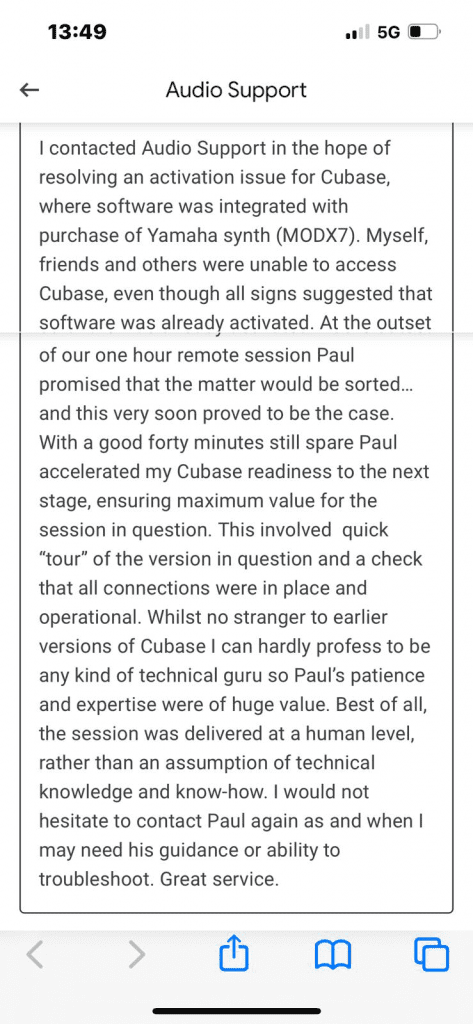
    After the session Mark was kind enough to send me this nice review to post here:

    Categories: , , ,

    No automated tickets, no waiting queues — just one-to-one help from an experienced music technology specialist. I’ll connect to your system remotely, identify the issue, and guide you through the fix.

    Recent problems solved for real clients.

    Optimising Logic Pro CPU Usage for Large Orchestral Mixes

    Client’s Question

    Why does Logic Pro keep crashing when I add plugins to my tracks?

    Session Result

    CPU load drastically reduced; mix workflow stabilised via bus routing.

    Read Full Case Study Report: Yamaha MODX7+ Setup with Cubase AI: Fixing Driver and MIDI Doubling Issues
    Preparing for a Studio Hardware Installation

    Client’s Question

    What cables do I need to connect my hardware synths to my mixer?

    Session Result

    Equipment audited, cable inventory confirmed, site visit planned.

    Read Full Case Study Report: Yamaha MODX7+ Setup with Cubase AI: Fixing Driver and MIDI Doubling Issues
    Mono Microphone Only in Left Speaker Fix in Logic Pro

    Client’s Question

    Why is my mono mic input only coming out of the left speaker in Logic Pro?

    Session Result

    Mono input successfully centred by changing Logic Pro track format from Stereo to Mono.

    Read Full Case Study Report: Yamaha MODX7+ Setup with Cubase AI: Fixing Driver and MIDI Doubling Issues
    Managing Native Instruments Komplete Libraries in Kontakt

    Client’s Question

    How do I hide unwanted libraries in the Kontakt side pane?

    Session Result

    Unused libraries hidden, visual clutter removed.

    Read Full Case Study Report: Yamaha MODX7+ Setup with Cubase AI: Fixing Driver and MIDI Doubling Issues
  • Anatares Autotune Licensing Problem in Pro Tools- Solved

    Anatares Autotune Licensing Problem in Pro Tools- Solved

    This case study explores a Pro Tools user’s inability to access their Antares Autotune plugins due to a licensing error. The key to the solution was identifying and removing corrupted CodeMeter licensing software. This post outlines the troubleshooting steps and the ultimate solution provided by Antares support.

    The Client’s Problem: Autotune Plug-ins Not Loading

    Hi Audio Support. Can you help me? I can’t open my Antares Autotune plugins. They show as Not Licensed when I try and open them in Pro Tools even though I have an Unlimited Subscription. – H

    Paul from Audio Support explains how he solved the problem

    I received the above message from H and we arranged a time to connect via Google Meet and Anydesk. Once I was inside H’s Mac she opened her copy of Pro Tools and showed me the problem.

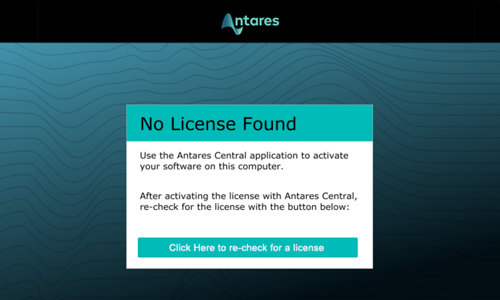
    All H’s Antares Unlimited plugins were showing the same message:

    Clicking the button to re-check for a license did nothing.

    This problem took a while to solve. Here’s a breakdown of the steps I went through in my first session with H.

    Initial Troubleshooting Steps

    Checking Antares Central and Auto-Tune Central Versions

    Looked at which versions of Antares Central and Auto Tune Central were installed on H’s Mac. Various tests to see if the versions were conflicting by uninstalling and reinstalling.

    Researched online to find out if other users we were having similar problems. They were, but no one could point to a clear solution.

    Uninstalling and Reinstalling Antares Plug-ins

    Uninstalled and reinstalled all Antares plugins via Auto Tune Central.

    Manually searched through the Mac’s library and preference files to try to do a full uninstallation of all Antares software on H’s Mac.

    Reinstalled. No difference.

    Went to the legacy downloads of the Antares site and tried installing different versions of Antares plugins. No difference.

    Testing Pro Tools in Rosetta Mode

    Checked whether opening Pro Tools in Rosetta mode affected anything. No difference.

    Trashing Pro Tools Preferences

    Tested whether removing Pro Tools’ preferences affected anything. No difference.

    Checking and Updating iLok Software

    Researched online further and found a forum post mentioning iLok causing conflicts with Antares licensing software. Tested iLok software was working and connecting to licensing servers. Updated iLok License Manager.

    Running the Antares License Cleaner App

    Found a forum post pointing to a small app called Antares License Cleaner. Downloaded and ran but made no difference.

    Contacting Antares Support

    I double-checked every troubleshooting step listed on the Antares site to make sure I hadn’t missed anything. I read through as many forum posts as I could find to see if anyone else had encountered and solved this problem.

    At this point, we had spent about 2.5 hours on the problem. The Antares website gave no more troubleshooting ideas apart from contacting Antares’ support.

    I typed out a detailed email to Antares (including screenshots) listing all the steps we had tried so far.

    Reply from Antares

    The next day we received a reply from Antares:

    Thanks for reaching out! We’re sorry to hear about the issue you’re experiencing and we apologize for the inconvenience. In this case, please try the steps below to uninstall Codemeter and then launch Auto-Tune Central.

    CodeMeter licensing software is a hidden element of the Antares/Auto Tune Central and somehow it was corrupted on H’s Mac.

    Here are the instructions provided by Antares:

    We followed the instructions and the problem was now resolved. All Antares plugins were now opening correctly within Pro Tools.

    Key Takeaways

    • The client’s Antares Autotune plugins were not loading in Pro Tools due to a licensing error.
    • Standard troubleshooting steps for Antares and Pro Tools licensing did not resolve the issue.
    • The root cause was identified as corrupted CodeMeter licensing software, which Antares Autotune relies on.
    • The solution involved completely uninstalling CodeMeter, restarting the computer, and then relaunching Auto-Tune Central to reactivate the licenses.
    Categories: , , ,

    Need help troubleshooting your audio plugins?

    Book a remote support session with Audio Support today.

    No automated tickets, no waiting queues — just one-to-one help from an experienced music technology specialist. I’ll connect to your system remotely, identify the issue, and guide you through the fix.

    Recent problems solved for real clients.

    Optimising Logic Pro CPU Usage for Large Orchestral Mixes

    Client’s Question

    Why does Logic Pro keep crashing when I add plugins to my tracks?

    Session Result

    CPU load drastically reduced; mix workflow stabilised via bus routing.

    Read Full Case Study Report: Anatares Autotune Licensing Problem in Pro Tools- Solved
    Preparing for a Studio Hardware Installation

    Client’s Question

    What cables do I need to connect my hardware synths to my mixer?

    Session Result

    Equipment audited, cable inventory confirmed, site visit planned.

    Read Full Case Study Report: Anatares Autotune Licensing Problem in Pro Tools- Solved
    Mono Microphone Only in Left Speaker Fix in Logic Pro

    Client’s Question

    Why is my mono mic input only coming out of the left speaker in Logic Pro?

    Session Result

    Mono input successfully centred by changing Logic Pro track format from Stereo to Mono.

    Read Full Case Study Report: Anatares Autotune Licensing Problem in Pro Tools- Solved
    Managing Native Instruments Komplete Libraries in Kontakt

    Client’s Question

    How do I hide unwanted libraries in the Kontakt side pane?

    Session Result

    Unused libraries hidden, visual clutter removed.

    Read Full Case Study Report: Anatares Autotune Licensing Problem in Pro Tools- Solved
  • Create Empty Button Hidden in Cubase Hub – Solved

    Create Empty Button Hidden in Cubase Hub – Solved

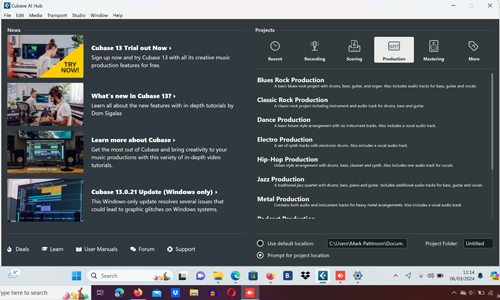
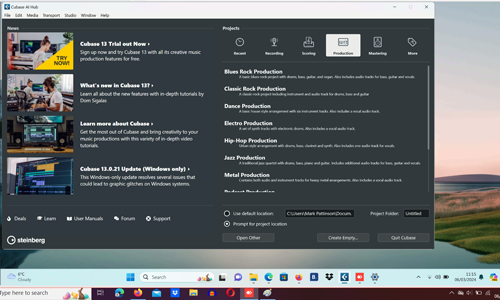
    Sometimes settings in Windows can cause Cubase to not fit onto the screen properly.

    In this example from a recent remote support session, the Create Empty button at the bottom of Cubase’s Hub is hidden from view.

    This problem can be solved by right-clicking on the desktop and selecting Display Settings from the menu.

    Change the Scaling settings to find the best fit for your screen. In the example pics, the problem was solved for my client by changing scaling from 200% to 175%.

    Categories: ,

    No automated tickets, no waiting queues — just one-to-one help from an experienced music technology specialist. I’ll connect to your system remotely, identify the issue, and guide you through the fix.

    Recent problems solved for real clients.

    Optimising Logic Pro CPU Usage for Large Orchestral Mixes

    Client’s Question

    Why does Logic Pro keep crashing when I add plugins to my tracks?

    Session Result

    CPU load drastically reduced; mix workflow stabilised via bus routing.

    Read Full Case Study Report: Create Empty Button Hidden in Cubase Hub – Solved
    Preparing for a Studio Hardware Installation

    Client’s Question

    What cables do I need to connect my hardware synths to my mixer?

    Session Result

    Equipment audited, cable inventory confirmed, site visit planned.

    Read Full Case Study Report: Create Empty Button Hidden in Cubase Hub – Solved
    Mono Microphone Only in Left Speaker Fix in Logic Pro

    Client’s Question

    Why is my mono mic input only coming out of the left speaker in Logic Pro?

    Session Result

    Mono input successfully centred by changing Logic Pro track format from Stereo to Mono.

    Read Full Case Study Report: Create Empty Button Hidden in Cubase Hub – Solved
    Managing Native Instruments Komplete Libraries in Kontakt

    Client’s Question

    How do I hide unwanted libraries in the Kontakt side pane?

    Session Result

    Unused libraries hidden, visual clutter removed.

    Read Full Case Study Report: Create Empty Button Hidden in Cubase Hub – Solved
  • Setting up Hardware Synths in Cubase 7.5

    Setting up Hardware Synths in Cubase 7.5

    Hi, I’m hoping you can help. I’m trying to integrate two external synths into Cubase7.5 on Windows 7 to use MIDI and record audio. The two synths are Nord Lead4 and the other is a Roland TR8S. Would this be something you could help with and could this be done remotely?

    Regards, Chris

    I received the above message from Chris and after a few emails to confirm his requirements we arranged a time to remotely connect the following weekend.

    This is a breakdown of how I helped Chris in a 2-hour remote support session:

    • Set up our remote connection via phone and Anydesk.
    • Had a chat to confirm details of what Chris wanted to achieve.
    • Resolved a problem with crackling audio – driver selection
    • Tested audio interface working correctly
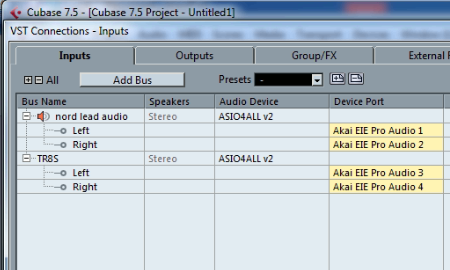
    • Cubase MIDI settings to connect with Nord Lead
    • Tested MIDI and audio connections for Nord Lead
    • Set up Roland TR8S to receive MIDI clock from Cubase
    • Tested sync and audio recording of TR8S working correctly
    • Set MIDI channels of hardware to avoid MIDI note conflicts
    • A short lesson for Chris on how to access his synths in Cubase and how to record audio and MIDI
    • Took screenshots of the settings pages
    • Made a Word Doc with screenshot images and notes for future reference

    At the end of the session, Chris was happy to have his synths working with Cubase and be able to set them up again for himself should he need to.

    Categories: , , ,

    No automated tickets, no waiting queues — just one-to-one help from an experienced music technology specialist. I’ll connect to your system remotely, identify the issue, and guide you through the fix.

    Recent problems solved for real clients.

    Optimising Logic Pro CPU Usage for Large Orchestral Mixes

    Client’s Question

    Why does Logic Pro keep crashing when I add plugins to my tracks?

    Session Result

    CPU load drastically reduced; mix workflow stabilised via bus routing.

    Read Full Case Study Report: Setting up Hardware Synths in Cubase 7.5
    Preparing for a Studio Hardware Installation

    Client’s Question

    What cables do I need to connect my hardware synths to my mixer?

    Session Result

    Equipment audited, cable inventory confirmed, site visit planned.

    Read Full Case Study Report: Setting up Hardware Synths in Cubase 7.5
    Mono Microphone Only in Left Speaker Fix in Logic Pro

    Client’s Question

    Why is my mono mic input only coming out of the left speaker in Logic Pro?

    Session Result

    Mono input successfully centred by changing Logic Pro track format from Stereo to Mono.

    Read Full Case Study Report: Setting up Hardware Synths in Cubase 7.5
    Managing Native Instruments Komplete Libraries in Kontakt

    Client’s Question

    How do I hide unwanted libraries in the Kontakt side pane?

    Session Result

    Unused libraries hidden, visual clutter removed.

    Read Full Case Study Report: Setting up Hardware Synths in Cubase 7.5
  • Resolving Digital Distortion: Sample Rate Mismatch Fixed with Audient iD24 and Logic Pro

    Resolving Digital Distortion: Sample Rate Mismatch Fixed with Audient iD24 and Logic Pro

    Hello Paul. I am running Logic on a 12-month-old, desktop Mac. Recently, I replaced my old interface (Behringer FCA 1616) with an Audient ID24 to work in conjunction with my Audient ASP800 (which was previously working fine with the Behringer). I can record, but the audio distorts. Can you help? Paul S

    I received the above message and Paul S and I arranged a time to connect. Once we were speaking on the phone and Paul S showed me the problem on AnyDesk it didn’t take long to work out where things were going wrong.

    Paul S’ recording setup was:

    • Mic
    • Audient ASP800 Mic Preamps
    • Audient ID24 Audio Interface
    • Mac
    • Logic Pro

    He needed to set a sample rate of either 44,100hz or 48,000hz and use the same sample rate throughout the chain. If he didn’t, he would either get sample rate error messages or digital distortion and glitches in his audio recordings.

    Paul S and I discussed the pros/cons of different sample rate options and he decided that 44.1 would suit him best as that was how he had been recording the majority of his projects up to now.

    We set the sample rate in all the devices and then made a few test recordings to check that audio was now recording correctly. We made some changes to his Logic template to confirm that new projects would be recorded at 44.1.

    For the remainder of the hour’s session, I showed Paul S some things he might find helpful to get the best out of his setup.

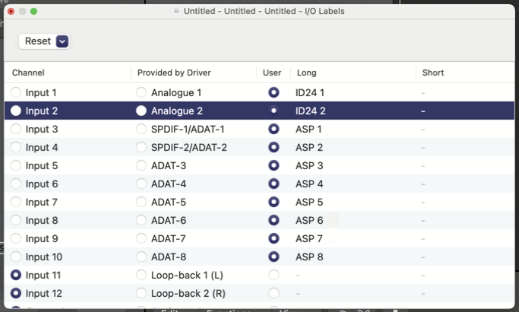
    I showed Paul S how to use the I/O labels feature in Logic to set the display names of his Logic Pro inputs to match the channels of his ASP800.

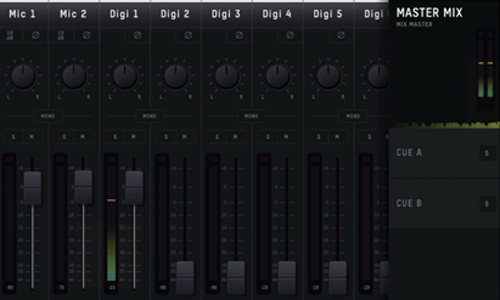
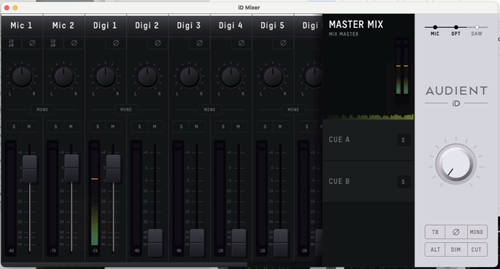
    I showed Paul S how the Audient OSX mixer software allowed him to directly monitor his audio inputs. This can be a useful feature, but it’s important to know how to turn direct monitoring on/off to avoid doubling the sound when recording in Logic Pro.

    At the end of the hour, Paul S kindly took the time to write me a Google review.

    Paul S also sent me his Spotify artist link by email and I’ve been enjoying some of his tracks while writing this article. Sharing here:

    Categories: , , ,

    No automated tickets, no waiting queues — just one-to-one help from an experienced music technology specialist. I’ll connect to your system remotely, identify the issue, and guide you through the fix.

    Recent problems solved for real clients.

    Optimising Logic Pro CPU Usage for Large Orchestral Mixes

    Client’s Question

    Why does Logic Pro keep crashing when I add plugins to my tracks?

    Session Result

    CPU load drastically reduced; mix workflow stabilised via bus routing.

    Read Full Case Study Report: Resolving Digital Distortion: Sample Rate Mismatch Fixed with Audient iD24 and Logic Pro
    Preparing for a Studio Hardware Installation

    Client’s Question

    What cables do I need to connect my hardware synths to my mixer?

    Session Result

    Equipment audited, cable inventory confirmed, site visit planned.

    Read Full Case Study Report: Resolving Digital Distortion: Sample Rate Mismatch Fixed with Audient iD24 and Logic Pro
    Mono Microphone Only in Left Speaker Fix in Logic Pro

    Client’s Question

    Why is my mono mic input only coming out of the left speaker in Logic Pro?

    Session Result

    Mono input successfully centred by changing Logic Pro track format from Stereo to Mono.

    Read Full Case Study Report: Resolving Digital Distortion: Sample Rate Mismatch Fixed with Audient iD24 and Logic Pro
    Managing Native Instruments Komplete Libraries in Kontakt

    Client’s Question

    How do I hide unwanted libraries in the Kontakt side pane?

    Session Result

    Unused libraries hidden, visual clutter removed.

    Read Full Case Study Report: Resolving Digital Distortion: Sample Rate Mismatch Fixed with Audient iD24 and Logic Pro
  • Remotely Configuring Cubase and Windows Audio

    Remotely Configuring Cubase and Windows Audio

    Hi Paul. When Cubase is active if I plug headphones into my tower’s stereo socket it cuts out all sound. Although I am getting a sound reading from my Cubase meter I just cannot hear it. Everything works well when Cubase is not activated and I can hear the stereo perfectly well when listening to Youtube. Can you help?

    Alan

    I received the above enquiry from Alan and we arranged an hour’s remote support session for the next day.

    From Alan’s initial enquiry, I had a good idea of what the problem was. This is how we spent the hour’s session:

    • Established our remote connection using AnyDesk
    • Checked over Alan’s system to make sure everything was installed correctly
    • Showed Alan how to find Cubase’s Device Setup and Audio Connections menus
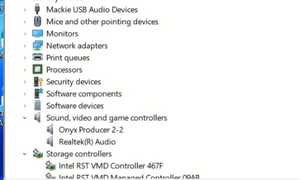
    • Configured the menus with the right settings for Alan’s system. I recommended Alan only use his Mackie 2.2 interface when working with Cubase to avoid having to do a lot of settings changes in the menus when switching devices.
    • Explained how Cubase and YouTube audio are handled differently by Windows
    • Showed Alan how to switch the audio output of Windows between his Mackie Producer interface and PC tower’s headphones socket using the volume icon in the Windows taskbar.
    • Typed out an instruction document with screenshots that Alan could follow to make changes in his system for himself in the future.
    • Checked that Alan was okay with the instructions and was able to follow them on his own. Tweaked the document to clarify some steps.

    After the hour’s session, Alan was kind enough to send me a nice review to post here:

    Paul was absolutely sensational, and immediately put an old Rock and Roller, reel to reel man like me at ease. Being a Cubase Pro 13 beginner, I was indeed having some serious monitoring issues which I must admit was a becoming great worry. He sorted this out in a fast, expert way by remote access, and explained how to manage these and other Cubase issues if they arise in the future. Many thanks to you, Paul, and I now know you are there if I have any other Cubase problems. 11 out of 10. Alan.

    Thanks Alan! Happy to help.

    Paul Andrews – Audio Support

    Categories: ,

    No automated tickets, no waiting queues — just one-to-one help from an experienced music technology specialist. I’ll connect to your system remotely, identify the issue, and guide you through the fix.

    Recent problems solved for real clients.

    Optimising Logic Pro CPU Usage for Large Orchestral Mixes

    Client’s Question

    Why does Logic Pro keep crashing when I add plugins to my tracks?

    Session Result

    CPU load drastically reduced; mix workflow stabilised via bus routing.

    Read Full Case Study Report: Remotely Configuring Cubase and Windows Audio
    Preparing for a Studio Hardware Installation

    Client’s Question

    What cables do I need to connect my hardware synths to my mixer?

    Session Result

    Equipment audited, cable inventory confirmed, site visit planned.

    Read Full Case Study Report: Remotely Configuring Cubase and Windows Audio
    Mono Microphone Only in Left Speaker Fix in Logic Pro

    Client’s Question

    Why is my mono mic input only coming out of the left speaker in Logic Pro?

    Session Result

    Mono input successfully centred by changing Logic Pro track format from Stereo to Mono.

    Read Full Case Study Report: Remotely Configuring Cubase and Windows Audio
    Managing Native Instruments Komplete Libraries in Kontakt

    Client’s Question

    How do I hide unwanted libraries in the Kontakt side pane?

    Session Result

    Unused libraries hidden, visual clutter removed.

    Read Full Case Study Report: Remotely Configuring Cubase and Windows Audio