
Hi Paul. I have an M2 Mac with Logic Pro and am struggling with lag and slow performance. I would like to book a session with you. – OB
I received the above message from a new client and we arranged a time to connect for a remote support session. Once we were speaking via WhatsApp voice chat and had connected our screens via AnyDesk my client explained his situation in more detail.
My client had been using Logic Pro on his Macs for many years and had recently purchased a new M2 Mac Studio. He had used Apple’s migration assistant to move the contents of his old mac to his new one. The process seemed to have been successful, but now Logic Pro wasn’t working smoothly. Sessions were slow to load and Logic was throwing up the vague “An Audio Unit Has Reported A Problem” error. I had seen this error before so I had some ideas on where to start the troubleshooting process.
I had a look at my client’s Mac’s plug-in library, folder structure and activity monitor to see what was going on in OSX while Logic was running.
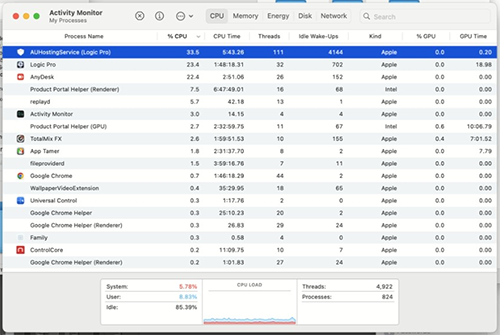
I could see some clues to the likely source of Logic’s problems, so I started working through resolving them.
Removing Incompatible Audio Units
Logic Pro’s error messages had told us that Audio Units were an issue, so I started the investigation there. I manually moved AU components in and out of my client’s Audio Plug-in Library to identify which ones were failing validation during Logic’s startup. During that process, we found a number of old plug-ins which were failing validation and my client didn’t want on his system any more. Many were demos which he had installed but were no longer required. I uninstalled the unwanted plug-ins.
Updating Old Audio Units
Some plug-ins were passing validation, but were old versions that were coded to run on Intel Macs. I explained that we needed to update these plug-ins to the Apple Silicon coded versions to allow them to run at maximum efficiency on my client’s M2 Mac.
I helped my client log in to the manufacturer’s websites and download the correct updates to his plug-ins. Once installed I checked that the old versions were removed and used Activity Monitor to check the AUHostingService processes and confirm no Intel Audio Units were running in his Logic project.
Removing Logic Projects From iCloud
My client was storing many of his Logic Projects and audio files on his desktop. iCloud was automatically moving some of these folders into my client’s cloud storage and removing the files from my client’s Mac. This is a useful feature for many Apple users but can be a major problem for pro audio users. If files are in the cloud, when Logic tries to access them they can’t be downloaded fast enough and Logic crashes. I showed my client how to select a non-iCloud location on his Mac to store his files and set up aliases to make the new location as easy to access as his desktop.
Organising Large Sample Libraries
I could see that my client was using a number of large sample libraries from East West, Native Instruments and Spitfire Audio on his system. He told me that he had bought a massive 20 TB external SSD to store all his files. When I checked the file paths of my client’s sample libraries, I found duplicated locations and that many sample libraries were stored on my client’s Mac’s Operating System drive.
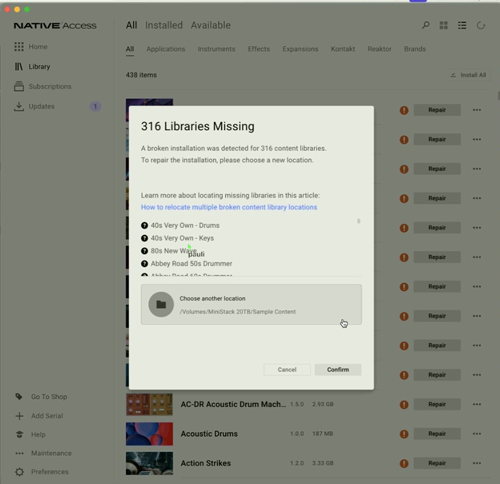
My client and I discussed how he wanted his new filing system to look like, and I helped him start the process of transferring files. Since the transfer of large files from one SSD to another can take many hours, I didn’t want to waste my client’s money by spending my time watching a progress bar. I gave my client a list of what he needed to copy and where, and then we arranged to connect the next day once it was all finished.
Once all the files were copied to their new locations, I deleted the unwanted copy from the Mac’s drive. I then used Native Access to repair the libraries by setting the new path.
I used the library manager Apps from Spitfire Audio and East West to repair my client’s other libraries.
Results
The issues took a number of remote sessions to resolve, but once everything was finished my client was very pleased to see that his Logic Pro projects were now opening quickly and with no error messages.
After our sessions, my client very kindly took the time to leave me this nice review:

Excellent guy, brilliant service, knows all about music and plugins and what can go wrong inside your computer. Highly recommended.
Thanks, Owen!
Happy to help with any other music technology related problems in the future. If anyone reading this has a similar issue and would like to hire expert support, please Get in Touch.
ABOUT THE AUTHOR

PAUL ANDREWS
I’m the owner and lead technician for Audio Support, a small company based in London, UK that connects remotely with clients worldwide to help them with their music technology issues. I’ve run Audio Support since 2005 and in that time I’ve seen and solved thousands of recording studio problems.
Outside of Audio Support, I run music workshops at a local school, play bass in a 90s tribute function band and perform modular synth jams with friends on Twitch.
Get support for similar problems
Get in Touch
- Use WhatsApp, email or the form below to contact us.
- We will confirm if we can help.
- We will arrange a date and time for a remote support session and send a link for you to make payment.
- At the agreed time, our technician will connect via voice call and remote desktop to resolve the issue.
Find out more about how our services work.