Last week I visited a client, R, in central London to help with a few setup questions he had in his studio. One of the topics we covered was:
Recording the Arpeggiated MIDI Output of a Yamaha Motif XF8 in Cubase
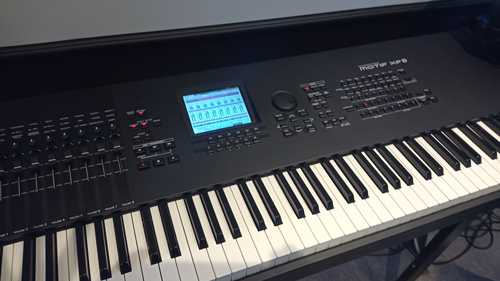
The Motif XF8 is a fantastic workstation keyboard. I have encountered it before in some of my other client’s studios and have always been impressed by the range of great sounds that come out of this unit.
I had previously worked with R in a remote technical support session, where I helped him set up his Yamaha Motif to be controlled by its VST editor plugin within Cubase. R was having a problem with the connection between Cubase and the Motif. The solution in that instance involved finding and installing the correct USB drivers to match R’s version of OSX.
R liked the Motif’s arpeggio patterns and been using them in his Cubase tracks. Currently, he was only able to record them as audio clips using the Motif’s synth engine. R wanted to be able to record the patterns as MIDI data that he could edit in Cubase and send to his VST instruments.
We started the process of working out how to record the arps by opening Cubase, creating a test project and confirming that the VST Motif editor was still working properly.
Once we had MIDI flowing in and out of the Motif and could adjust the settings in the editor, the solution wasn’t too hard to find.
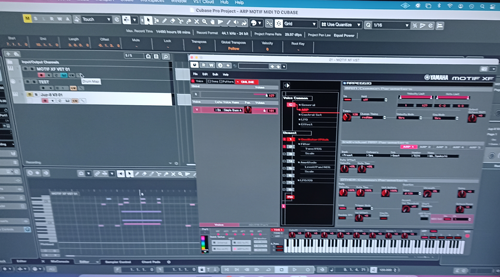
In the bottom left of the editor plugin, we enabled the MIDI option ARP TO PC.
In Cubase we set up a new MIDI track to record the output of the Motif. One thing that created an issue was that the MIDI outputs of both the VST editor and the hardware of the Motif were both selectable as inputs for our new MIDI track. We initially selected the VST editor’s output as the input for the track, but this recorded both the unprocessed MIDI coming from the keyboard presses and the arpeggios generated by the Motif.
We experimented with the Local Control settings on the Motif, but this didn’t work. We looked at how MIDI was being routed from the Motif to Cubase and discovered our mistake was within the MIDI track’s input settings.
Once we worked out the cause of the conflict, the solution was simple. We selected MOTIF USB MIDI INPUT (1) as our Cubase track’s MIDI input and when we tested again only the arpeggios were being recorded.
We tested the setup by recording and editing some Motif MIDI patterns in Cubase.
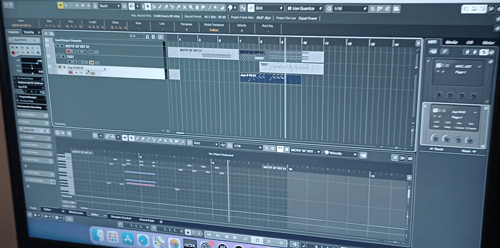
R made some notes and a video to help him remember how to set it up again without my help in the future.
Recent Reviews
Let’s Get Your System Running Smoothly.
No automated tickets, no waiting queues — just one-to-one help from an experienced music technology specialist. I’ll connect to your system remotely, identify the issue, and guide you through the fix.
More Case Studies
Recent problems solved for real clients.
Optimising Logic Pro CPU Usage for Large Orchestral Mixes
3 January 2026
Client’s Question
Why does Logic Pro keep crashing when I add plugins to my tracks?
Session Result
CPU load drastically reduced; mix workflow stabilised via bus routing.
Read Full Case Study Report: Setting up Cubase to record MIDI arpeggio patterns generated by a Yamaha Motif XF8Preparing for a Studio Hardware Installation
14 December 2025

Client’s Question
What cables do I need to connect my hardware synths to my mixer?
Session Result
Equipment audited, cable inventory confirmed, site visit planned.
Read Full Case Study Report: Setting up Cubase to record MIDI arpeggio patterns generated by a Yamaha Motif XF8Mono Microphone Only in Left Speaker Fix in Logic Pro
14 December 2025

Client’s Question
Why is my mono mic input only coming out of the left speaker in Logic Pro?
Session Result
Mono input successfully centred by changing Logic Pro track format from Stereo to Mono.
Read Full Case Study Report: Setting up Cubase to record MIDI arpeggio patterns generated by a Yamaha Motif XF8Managing Native Instruments Komplete Libraries in Kontakt
12 December 2025

Client’s Question
How do I hide unwanted libraries in the Kontakt side pane?
Session Result
Unused libraries hidden, visual clutter removed.
Read Full Case Study Report: Setting up Cubase to record MIDI arpeggio patterns generated by a Yamaha Motif XF8