As part of a recent remote support session about setting up Native Instrument’s Komplete package with Ableton Live during a booking on Fiverr, I was asked the following question:
Why do I have to press so hard on my Komplete Kontrol S88 MK3 keyboard to get my piano notes to sound right?
I explained to my client:
When playing a MIDI keyboard, the speed that your finger presses the keys is recorded as Velocity information in the MIDI data being sent to your MIDI instrument. The sensitivity of the keyboard to the speed of the player’s fingers can be adjusted.
If you find that the notes sound too quiet, we have two options.
- Adjust the velocity response curve of the MIDI Keyboard,
- Change the velocity responsiveness in the MIDI instrument,
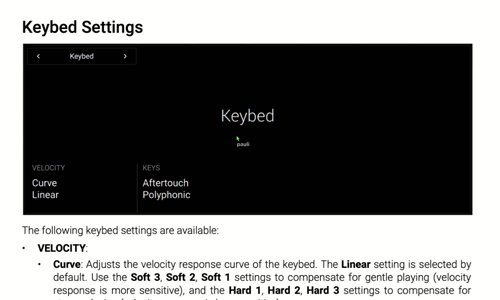
Using the S88’s manual, I explained to my client how to find the Keybed Velocity Curve settings and how to find a velocity response curve that suits his style of playing.
Then, using Ableton, I showed him how most MIDI instruments allow the user to change the velocity sensitivity within the instrument. By changing between Ableton and Kontakt pianos, we could see there was a difference in velocity responsiveness between instruments even with a default velocity curve.
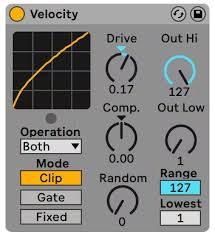
We also looked at how to use a MIDI effect plug-in in Ableton to control the velocity response.
This question was answered as part of a remote lesson helping a client set up Native Instrument’s Komplete package with Ableton Live. If you have any questions about MIDI keyboards, Ableton Live or any aspect of music technology, please get in touch.
Recent Reviews
Let’s Get Your System Running Smoothly.
No automated tickets, no waiting queues — just one-to-one help from an experienced music technology specialist. I’ll connect to your system remotely, identify the issue, and guide you through the fix.
More Case Studies
Recent problems solved for real clients.
Optimising Logic Pro CPU Usage for Large Orchestral Mixes
3 January 2026
Client’s Question
Why does Logic Pro keep crashing when I add plugins to my tracks?
Session Result
CPU load drastically reduced; mix workflow stabilised via bus routing.
Read Full Case Study Report: Optimising Logic Pro CPU Usage for Large Orchestral MixesPreparing for a Studio Hardware Installation
14 December 2025

Client’s Question
What cables do I need to connect my hardware synths to my mixer?
Session Result
Equipment audited, cable inventory confirmed, site visit planned.
Read Full Case Study Report: Preparing for a Studio Hardware InstallationMono Microphone Only in Left Speaker Fix in Logic Pro
14 December 2025

Client’s Question
Why is my mono mic input only coming out of the left speaker in Logic Pro?
Session Result
Mono input successfully centred by changing Logic Pro track format from Stereo to Mono.
Read Full Case Study Report: Mono Microphone Only in Left Speaker Fix in Logic ProManaging Native Instruments Komplete Libraries in Kontakt
12 December 2025

Client’s Question
How do I hide unwanted libraries in the Kontakt side pane?
Session Result
Unused libraries hidden, visual clutter removed.
Read Full Case Study Report: Managing Native Instruments Komplete Libraries in Kontakt