Case Study
Cubase Startup Crash – Diagnosing the asio.sys Error
The Client’s Challenge
I worked with a film composer who was facing a particularly frustrating interruption to his workflow. He contacted Audio Support because he was unable to open his main production software, Cubase.
The symptoms were specific and alarming: he would attempt to launch Cubase, the loading splash screen would appear, run through a few initialisation steps, and then simply vanish. There were no error messages within the application, and no crash logs were immediately obvious. The software just disappeared, leaving him staring at his desktop wallpaper.
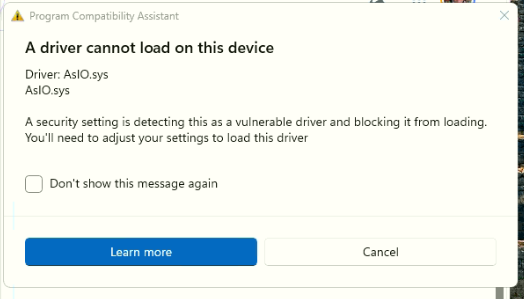
However, he noted a second anomaly. Every time he booted up his Windows PC, he received a system error message stating that asio.sys could not be located. While he initially thought these might be separate issues, my experience suggested they were almost certainly linked.
Session Setup
We connected remotely so I could view his screen and control the mouse. As with all Audio Support sessions, I started by taking a holistic look at the machine’s current state rather than diving immediately into settings menus.
The client sent me a photo of the asio.sys error message he received on startup. In the background of that photo, I noticed an ASUS driver updating utility window. This was a crucial clue. “ASIO” stands for Audio Stream Input/Output, the protocol used by professional audio software to communicate with hardware. If a system file named asio.sys was missing, it was highly likely that the computer’s ability to handle low-latency audio was compromised.

Diagnosis
To confirm my suspicion, I asked the client to launch Cubase again while I watched the splash screen closely.
Cubase, helpfully (unlike some other DAWs), lists the components it is loading in real-time on the splash screen. I watched as it loaded the video engine and the VST 2.x plug-in manager. However, the moment the text changed to “Initialising Audio Engine,” the program crashed to the desktop.
This confirmed the diagnosis: the audio engine was failing to start because the underlying driver architecture was broken or missing a component.I performed some quick research and found that asio.sys errors are frequently associated with ASUS motherboard updates conflicting with audio drivers. I also noticed the client was using a Tascam 4×4 HR audio interface. In a previous session, we had discovered that the dedicated Tascam drivers were unstable on his specific build of Windows, so we had been relying on ASIO4ALL—a universal audio driver that acts as a bridge between hardware and software.
The Fix
My primary goal was to restore the asio.sys file or provide a valid alternative driver that Cubase could latch onto during startup.
First, I reinstalled the ASIO4ALL driver (version 2.14). Although this software is quite old now, it remains a remarkably robust tool for solving driver conflicts on Windows systems.
Immediately after the reinstall, we launched Cubase. It successfully passed the “Initialising Audio Engine” stage, and the client’s project loaded perfectly. He was able to play back his compositions, and the panic subsided.
However, I wanted to ensure this was a permanent fix. I asked the client to restart the computer.
Unfortunately, upon reboot, the Windows error message—asio.sys not found—returned. When we tried to open Cubase, it crashed again. The system was seemingly wiping the file or losing the path permission upon restart.
We then attempted to install the official Realtek audio drivers recommended by the ASUS update utility, hoping this would restore the missing system component. This did not solve the issue, and I eventually disabled the Realtek device to prevent it from interfering with the Tascam interface.
Result
With our one-hour session time approaching its limit, we had to make a pragmatic decision. We hadn’t found the root cause of why Windows was deleting or misplacing the asio.sys file on reboot, but we did have a working solution.
I demonstrated that running the ASIO4ALL installer—which takes about 30 seconds—immediately fixed the problem for that session. The client was satisfied with this workaround. He agreed that adding one minute to his morning startup routine was an acceptable trade-off to get back to composing immediately, rather than spending more hours on deep system diagnostics.
We established a workflow:
- Turn on PC.
- Run the ASIO4ALL installer.
- Open Cubase and work.
Reflection
I have marked this case as “unsolved” in my internal logs, even though the client is back to work. As a technician, I prefer a clean fix where the system works perfectly without user intervention.
Reflecting on the session, I suspect the issue may relate to administrative privileges. If we had run the installer specifically as an Administrator, or adjusted the permissions of the folder where asio.sys resides, it might have stuck after a reboot. I also considered disabling Windows system integrity checks, but decided against it; compromising the security of a client’s machine to fix an audio driver is rarely the right choice.
This case serves as a reminder that sometimes, in professional production environments, a reliable workaround is more valuable than a perfect but time-consuming repair. The client didn’t need a perfect computer; he needed to write music today.
Closing Thoughts
Audio driver conflicts on Windows can be notoriously difficult to pin down, especially when manufacturer update utilities interfere with DAW operations. I help musicians and producers worldwide solve problems like this every day. If you’re struggling with Cubase crashes or driver errors, I’ll help you find the real cause—or a reliable workaround—so you can get back to creating.
Recent Reviews
Let’s Get Your System Running Smoothly.
No automated tickets, no waiting queues — just one-to-one help from an experienced music technology specialist. I’ll connect to your system remotely, identify the issue, and guide you through the fix.
More Case Studies
Recent problems solved for real clients.
The Turkey Adventure Part 4
24 December 2025
The Turkey Adventure Part 3
24 December 2025

The Turkey Adventure Part 2
24 December 2025