
Hi Paul. I just tried to open Ivory 2 in Cubase on my Mac and I get an error message saying the library files are missing. Can you help? – NH
I received the above message from an existing client and we arranged a time to connect for a remote support session.
Once my client and I were speaking on WhatsApp and I was viewing his screen via AnyDesk, he showed me the error message that displayed in Cubase when he tried to load Ivory II as a VST Instrument.
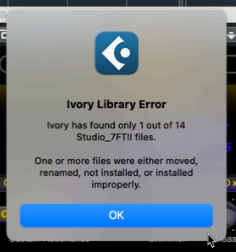
I told my client this wouldn’t be a problem. The most likely reason for this error was that the files had been moved or a folder name had been changed.
Using the Ivory Library Tool found in the Applications folder, I checked where Ivory was looking for its content files. I checked the folder but it was empty.
I then used Mac’s search feature and manually explored the folders to search my client’s Mac for the library files. Strangely, they were completely missing. I couldn’t explain why they had disappeared and my client told me that Ivory had been working fine a week ago.
I checked that my client wasn’t using iCloud to manage the storage on his sample library locations. It wasn’t. I told my client that I couldn’t explain why, but the files were definitely gone from his Mac and we would need to download them again.
I then helped my client navigate the Synthology website and input his user data and product serial number to get a new download link to the sample files.
The file sizes were large so I ran the installer and set the download going. I told my client that he would need to leave it running for a few hours and then click through the steps to finish the installation when everything was downloaded.
Additional Support
I checked in with my client the next day and he confirmed the download had completed. The installer had finished running and Ivory II was now opening without issue as a VST instrument in Cubase.
Recent Reviews
Let’s Get Your System Running Smoothly.
No automated tickets, no waiting queues — just one-to-one help from an experienced music technology specialist. I’ll connect to your system remotely, identify the issue, and guide you through the fix.
More Case Studies
Recent problems solved for real clients.
Optimising Logic Pro CPU Usage for Large Orchestral Mixes
3 January 2026

Client’s Question
Why does Logic Pro keep crashing when I add plugins to my tracks?
Session Result
CPU load drastically reduced; mix workflow stabilised via bus routing.
Read Full Case Study Report: Optimising Logic Pro CPU Usage for Large Orchestral MixesPreparing for a Studio Hardware Installation
14 December 2025

Client’s Question
What cables do I need to connect my hardware synths to my mixer?
Session Result
Equipment audited, cable inventory confirmed, site visit planned.
Read Full Case Study Report: Preparing for a Studio Hardware InstallationMono Microphone Only in Left Speaker Fix in Logic Pro
14 December 2025

Client’s Question
Why is my mono mic input only coming out of the left speaker in Logic Pro?
Session Result
Mono input successfully centred by changing Logic Pro track format from Stereo to Mono.
Read Full Case Study Report: Mono Microphone Only in Left Speaker Fix in Logic ProManaging Native Instruments Komplete Libraries in Kontakt
12 December 2025

Client’s Question
How do I hide unwanted libraries in the Kontakt side pane?
Session Result
Unused libraries hidden, visual clutter removed.
Read Full Case Study Report: Managing Native Instruments Komplete Libraries in Kontakt